A customer request lands in your inbox while you're preparing for a meeting. You forward it for approval, update the project tracker, then discover a colleague has entered it in another spreadsheet. By the afternoon, the customer wants an update, but nobody can quickly confirm who owns the next step.
Why Workflow Automation Matters Now
The frustrating part isn't necessarily the work itself. It's the coordination around it: finding information, chasing permission, checking versions and reminding someone that a task is waiting. In a small or mid-sized business, those responsibilities can fall to people who are also managing customers, projects and delivery.
Disconnected inboxes and spreadsheets make it difficult to distinguish an overloaded team from a poorly designed process. A manager might see an overdue request without knowing whether it's missing information, awaiting approval or sitting with the wrong person. Asking everyone for an update creates more administration without fixing the underlying problem.
From scattered activity to organised work
Workflow automation connects the steps through which work moves. Rather than relying on someone to remember every handoff, you establish how requests enter, who handles them and what should happen next.
The broader rationale has support in New Zealand research. MBIE's analysis of ICT use and productivity found that businesses increasing the intensity of their ICT use were more likely to improve productivity during the following two years. That finding doesn't establish what any particular automation platform will deliver, but it supports examining how digital systems change everyday operations.
Practical rule: Judge automation by how work improves, not by how many actions the software performs.
The most useful starting questions are operational:
- Where does work wait? Identify delays between activities, not just slow activities.
- Who needs clarity? Establish which decisions staff and managers can't currently make confidently.
- What would improvement look like? Choose observable outcomes, such as shorter turnaround or fewer corrections.
The benefits of workflow automation become credible when they're connected to those questions. Buying software is a purchasing decision. Building a dependable way of working requires process design, accountable people and evidence that the changes help.
Understanding Workflow Automation
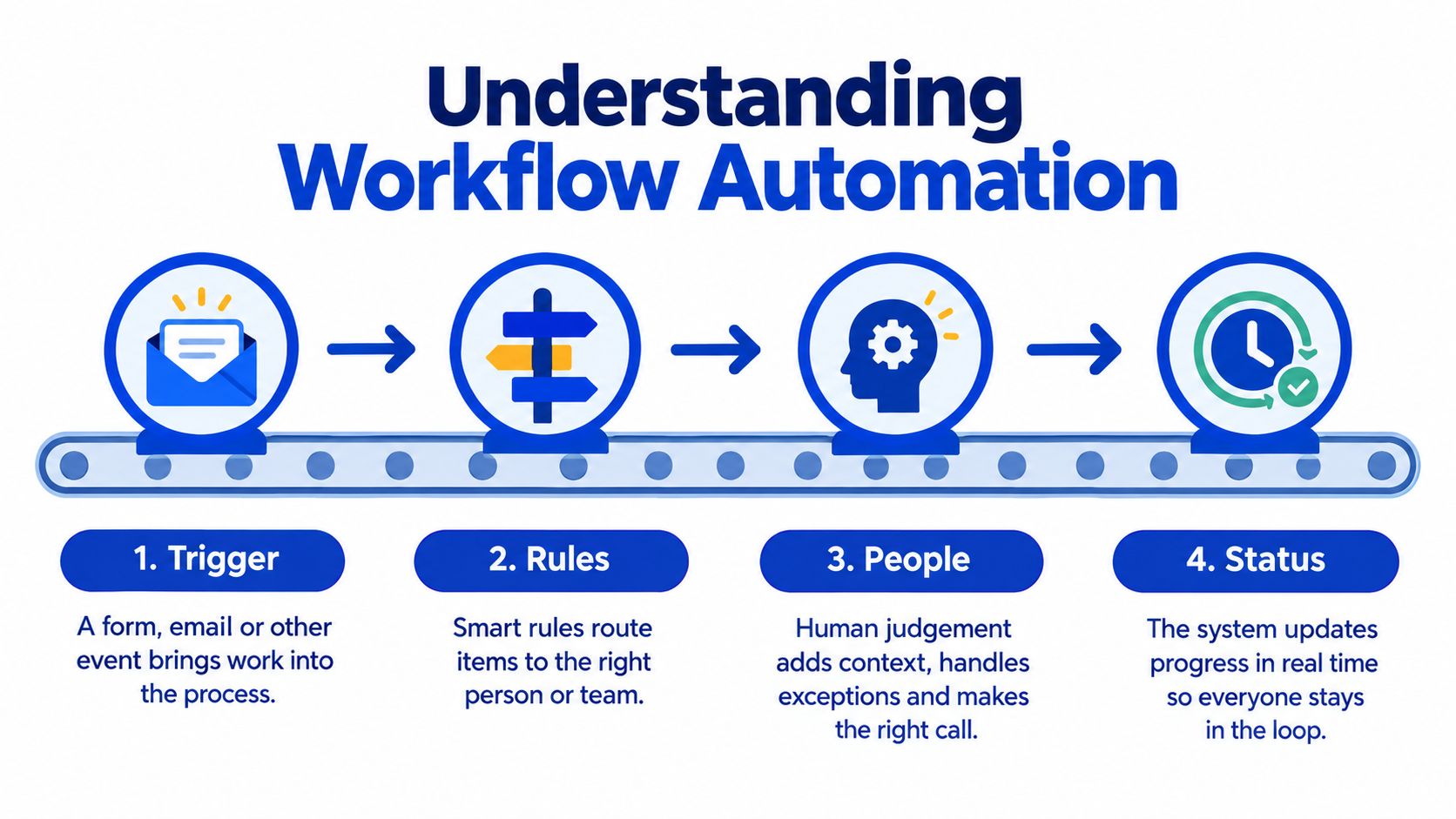
Think of an automated workflow as an assembly line for information. A request enters, follows an agreed route and reaches people who contribute expertise. Unlike a physical production line, it might pass between a CRM, a project board and a finance system.
The basic sequence is straightforward:
- Trigger: An event starts the workflow, such as a submitted form or an approved quote.
- Rules: Conditions determine the route, including which team should receive the work.
- People: An employee reviews, approves or resolves something that requires judgement.
- Status updates: The system records progress so authorised colleagues can see what's happening.
The diagram shows how these elements connect.
Digitising isn't the same as redesigning
Moving a paper request into an online form is digitisation. It may make submission easier, but someone could still need to copy the information, find an approver and send progress emails.
A connected workflow could instead create the work item, assign an owner, request approval and notify the requester when a decision is recorded. The difference is the connection between activities, not the format of the form.
For a resource on coordinating those connections, workflow orchestration with Yellow.ai offers a product-specific perspective to consider alongside your own process map. Assess any approach against the applications, permissions and exception paths your organisation needs.
Controlled delegation rather than blind autonomy
Automation doesn't require artificial intelligence. A clearly defined rule can route a request without interpreting language or generating content. AI may help with less structured inputs, but it introduces different accuracy and review considerations.
New Zealand's 2018 Business Operations Survey found that 28% of businesses had introduced automation during the preceding two years, with data processing the most common area.
A dependable design also specifies what happens when the normal route fails. Missing information should prompt a correction request; an unavailable approver needs a delegate; an unsuccessful system update needs an alert. These aren't peripheral details. They determine whether people can rely on the workflow.
Uncovering the Business Benefits
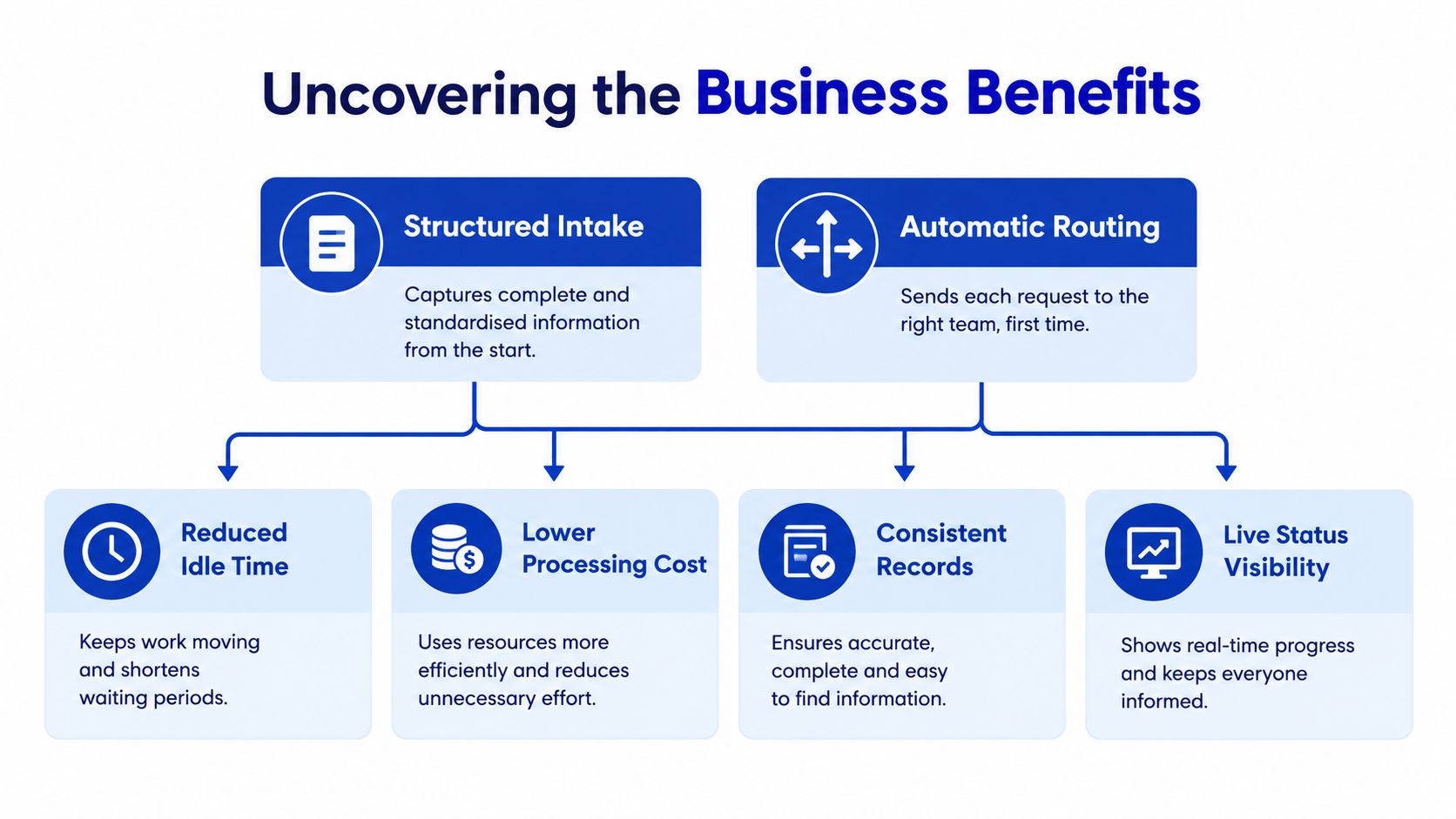
The strongest benefits of workflow automation come from changing the conditions around a task. A request may take little time to assess but spend much longer waiting for someone to notice it. Automatic routing addresses that waiting period, while structured intake addresses the missing information that might otherwise cause another delay.
This cause-and-effect view helps separate useful outcomes from attractive software features.
Efficiency and capacity
When staff no longer re-enter the same information or manually distribute routine requests, they can spend more attention on delivery. The relevant outcome is less handling effort per completed item, not more notifications or faster clicking.
Evidence from AI adoption is encouraging, although it isn't proof of results from rules-based workflow automation. In Callaghan Innovation's 2024 survey of 232 valid respondents, 96% of organisations using AI reported greater worker efficiency, 62% reported operational cost savings and 50% reported a positive financial impact on output, while 8% reported employee replacement.
The distinction matters: increased capacity and reduced headcount aren't interchangeable outcomes. A business might use available capacity to improve service, absorb demand or clear overdue work.
The value comes from improving the system around the task, not merely moving the task from one screen to another.
Visibility, quality and control
A shared record gives managers a basis for investigating delays without requesting separate updates. Its value depends on whether statuses reflect actual work, rather than employees maintaining a dashboard that nobody trusts.
Validation can prevent an incomplete request from progressing, while standard fields can reduce inconsistent entries. Neither guarantees accuracy. An incorrect rule can repeatedly produce an incorrect result, so quality checks still matter.
The wider business case includes:
- Governance: Recorded approvals can help demonstrate that required reviews occurred. They don't establish legal compliance by themselves.
- Collaboration: Agreed ownership reduces uncertainty at departmental boundaries, particularly when finance, sales and delivery depend on the same information.
- Cost control: Less avoidable rework can lower processing effort, provided implementation and maintenance costs don't outweigh the benefit.
- Investment decisions: Consistent operational records make it easier to compare the intended improvement with what happened.
These benefits reinforce one another, but they shouldn't be bundled into a vague promise of transformation. Each needs its own observable outcome and an explanation of how the proposed design will produce it.
Choosing Where Automation Creates Value
A conveyor can speed a kitchen only where plates repeat; an allergy request still needs a cook who can judge context. Service work behaves the same way. A recurring access request may have stable categories, known owners and a clear definition of complete. A customer dispute can carry history, tone and risk that no routing rule should settle alone.
The selection point is the operating design around the task, not the purchase of another tool. A platform can move work, but the organisation still has to agree who may override a rule, what evidence counts as enough, and which number proves the change helped.
| Signal in the work | Safer design response | Outcome to watch |
|---|---|---|
| Requests repeat with similar information | Standard intake and routing | Cycle time and queue age |
| Rules stay stable across cases | Validation plus automated handoffs | Corrections and rework |
| Context changes the decision | Human review lane with prepared evidence | Escalation accuracy and time to decision |
| Consequences are high | Recorded approval, clear owner, override path | Error impact and recovery effort |
| Volume grows faster than staffing | Automation for routine coordination only | Backlog trend and service level |
Partial automation is often the honest answer. Software can assemble the file, check required fields and surface policy context while a person keeps authority over the decision. In procurement, for example, routine purchases might move quickly once budget and supplier status are confirmed, while an unusual commitment still reaches a named approver.
Test four conditions before choosing a platform: whether people can supply reliable inputs, whether decisions repeat without interpretation, whether systems can exchange information without fragile workarounds, and what damage follows if a route or update is wrong. A process-improvement assessment helps separate a redundant approval from a control that protects customers, so the design removes effort without removing accountability.
Choose the workflow whose workload, failure mode and improvement measure are visible before any licence is signed.
See Workflow Automation Across Roles
A single customer order can touch five desks in a week. Sales confirms the deal, operations schedules the work, finance matches the invoice, IT grants access and a delivery team produces the result. Automation rarely wins on the speed of any one step; the gain sits in whether each handoff arrives complete, owned and visible. Treat the examples below as illustrative designs rather than client case studies, and notice that each pairs a familiar problem with an outcome you can measure.

Operations. A coordinator who fields requests through messages, meetings and email spends much of the day rebuilding a picture of the workload. In a redesigned monday.com workflow, colleagues submit requests through an agreed intake route and project owners maintain delivery milestones in the same workspace, so the coordinator's attention goes to stalled or unassigned work instead of reconstruction. The measure that matters: coordination effort and overdue items, week by week.
Finance. An invoice arrives without enough detail to identify the responsible project. A designed approval workflow requests the missing coding, collects supporting material and records the authorised decision before the transaction proceeds. Connecting operational data with accounting takes careful field mapping and clear ownership, so a monday.com and Xero integration is one option worth assessing in that context. Virtual CFO support, budgeting, forecasting and cashflow planning then help leaders interpret commitments and financial implications, which keeps approval speed from becoming the only objective.
IT and security. An access request needs more than a notification. A proposed workflow should identify the requester, the required permissions, the approving manager and the person responsible for confirming completion. Managed IT, cloud and cybersecurity specialists help keep convenience inside access controls rather than routing around them.
Media and production. When content passes between contributors, a TPN-aligned environment should be assessed against requirements for permissions, asset handling, review and delivery records. A project board on its own is no evidence that the surrounding infrastructure meets those requirements.
For a work-management demonstration, the embedded video provides another reference point.
Sales and marketing. The same thinking applies to a customised CRM pipeline:
- Lead tracking: Capture the enquiry, assign responsibility and record the next action.
- Handover: Pass agreed customer requirements to delivery without relying on a salesperson's memory.
- Forecasting: Use consistently maintained stages as inputs, while retaining commercial judgement about likely revenue.
Step back and the connective thread is clear. The workflow coordinates the activity; finance, IT and operational specialists judge whether that activity is sound. Each role can name what improved, who confirms it and which number should move. The benefit compounds when designed process, human accountability and measured outcome come together, and it stays thin when any one of them is missing.
Implement Automation Without Creating New Friction
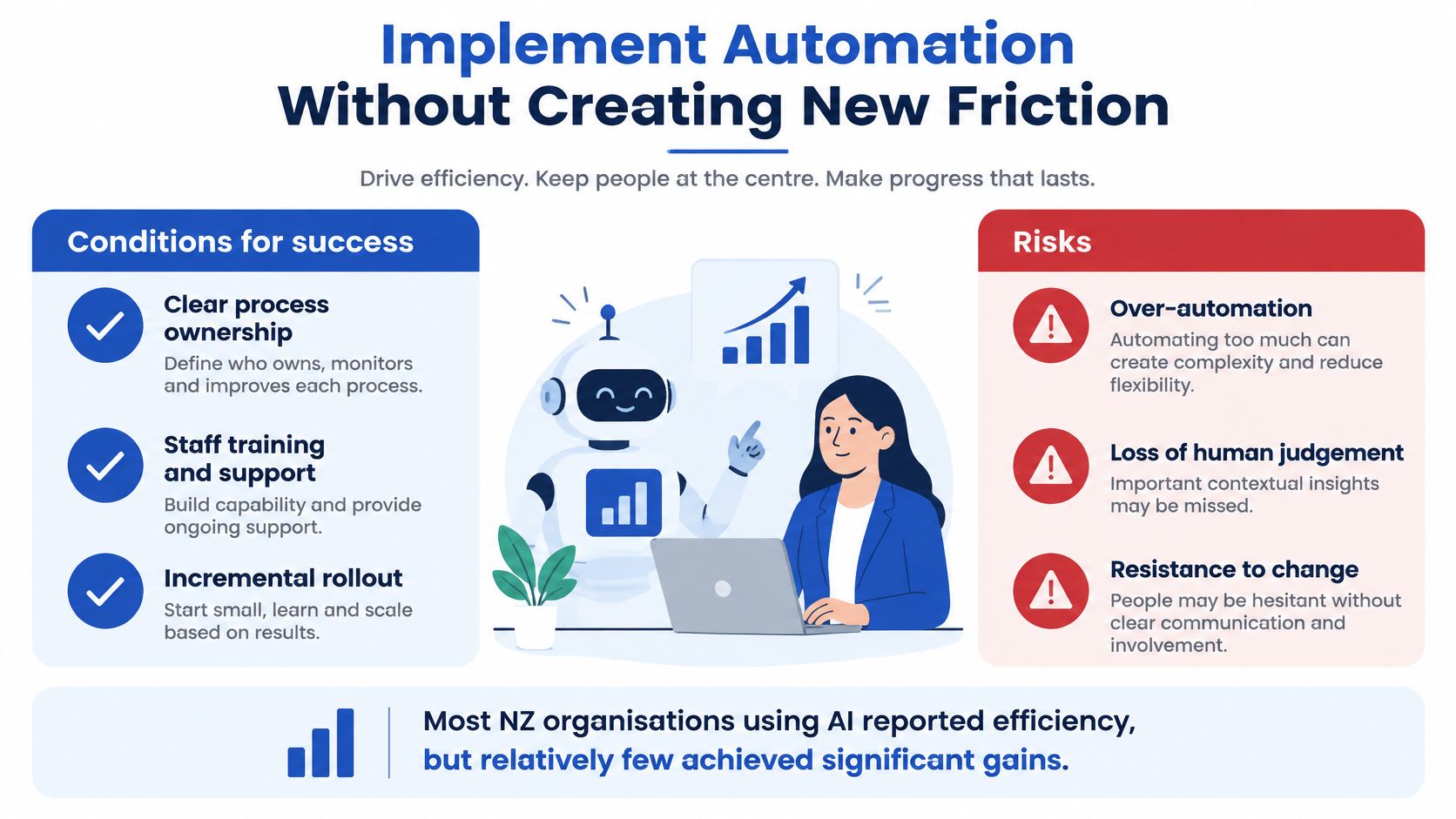
Installing a platform doesn't establish that work has improved. Staff may still maintain unofficial spreadsheets, managers may receive excessive alerts, and employees may spend time checking automated actions they don't trust.
The distinction between adoption and substantial improvement appears in New Zealand evidence. Datacom's 2025 findings, summarised in MBIE's SME adoption research, show that 89% of AI users reported productivity gains, but 20% reported significant gains of at least 25% more output or time saved, while 28% reported moderate gains of 10–25%.
Those are AI findings, not a forecast for your workflow project. They're a useful reason to challenge the assumption that access to technology automatically produces substantial operational improvement.
Make accountability explicit
Assign a process owner who can approve changes, resolve disputed responsibilities and review failures. Involve frontline employees early, because they can identify the informal workarounds that a manager's process map may miss.
The following visual summarises the implementation trade-offs.
| Do | Don't |
|---|---|
| Explain how responsibilities will change | Leave employees to infer what automation means for their jobs |
| Test ambiguous and unsuccessful requests | Demonstrate only the ideal route |
| Review privacy, access and security | Copy sensitive information into every connected application |
| Budget for support and maintenance | Treat go-live as the end of the investment |
Training should cover judgement as well as navigation. People need to recognise an incorrect result, know when to stop the workflow and understand who can authorise a correction.
Keep automation within an appropriate boundary
Customer communication illustrates why scope matters. A resource such as BenchKey's review automation for repair shops can help frame a narrow use case, but a routine review invitation shouldn't be confused with resolving a complaint or responding to a sensitive experience.
Similarly, a monday.com implementation programme should include adoption, permissions and support alongside configuration. Explain whether the intended benefit is additional capacity, improved service or another outcome, and retain human approval for ambiguous, sensitive or high-consequence decisions.
Measure ROI With Practical KPIs
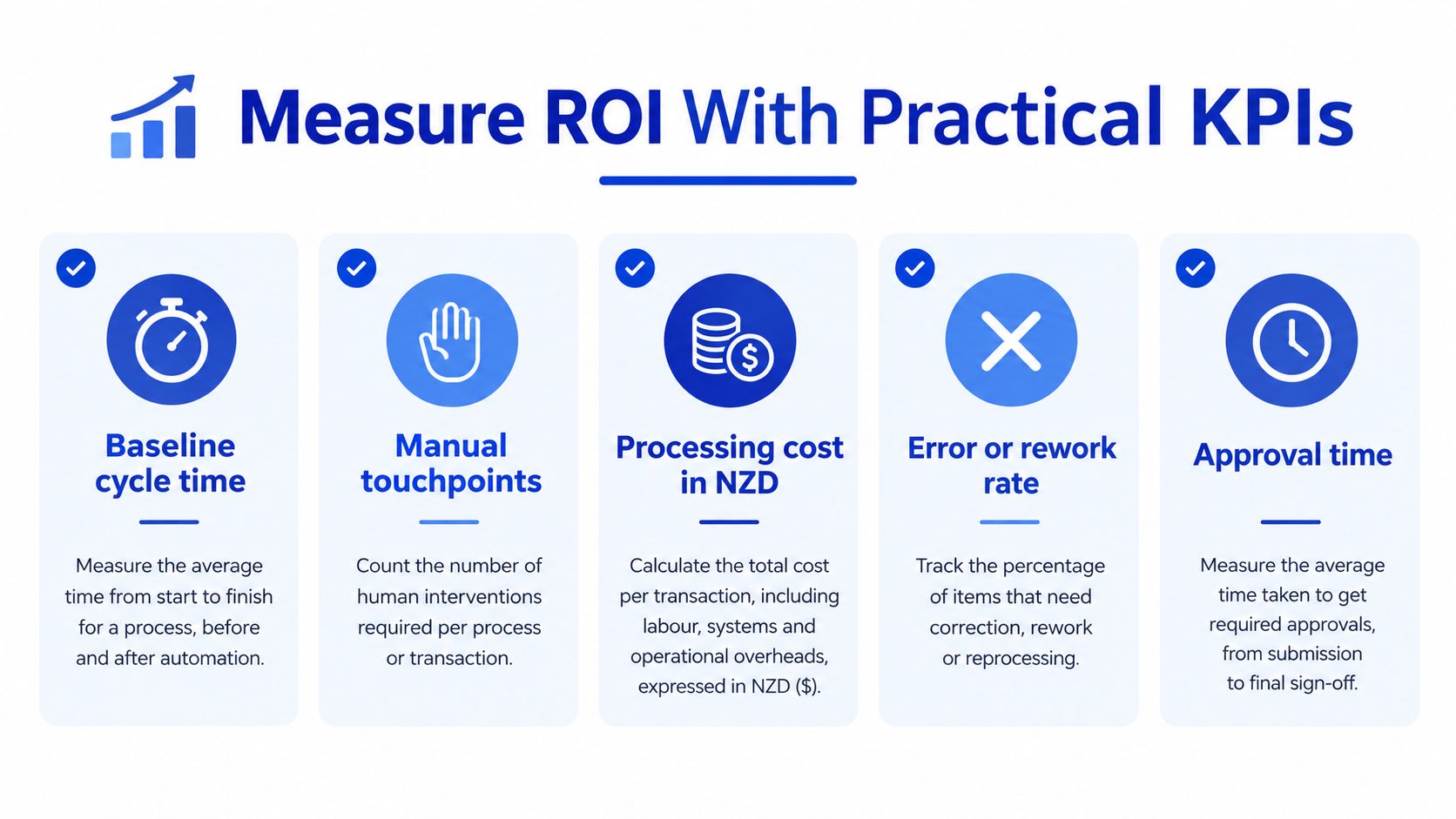
Measurement works like weighing goods on a warehouse scale: the number means nothing unless you recorded a weight before and after. Start measuring before changing the workflow. A more organised interface can otherwise feel like progress without giving you a defensible comparison.
Define where each measure starts and ends. Cycle time might run from submission to completion, while approval turnaround runs from a complete approval request to a recorded decision. Mixing those definitions makes it difficult to identify which part improved.
Connect operational measures to business outcomes
| KPI | What to record | What it helps you evaluate |
|---|---|---|
| Cycle time | Elapsed time from agreed start to finish | Delivery speed |
| Manual touchpoints | Human interventions required per item | Coordination and handling effort |
| Processing cost | Labour effort and attributable system costs in NZD | Cost per completed item |
| Error or rework rate | Items requiring correction against completed items | Quality |
| Approval turnaround | Time awaiting an authorised decision | Decision bottlenecks |
| Exception volume | Work leaving the standard route | Suitability of rules and inputs |
| Service quality | Relevant complaints, missed commitments or user feedback | Whether speed compromises service |
Read the measures as a set rather than in isolation. A faster process that produces more corrections may move effort downstream, and higher throughput per employee is more persuasive when work quality and service commitments hold steady.
One distinction trips up many ROI discussions. Released staff hours create capacity; they become cash savings only when payroll or contractor spend is reduced. If a support team saves ten hours a week and uses that time to clear a backlog of customer requests, the honest result is additional capacity, not a smaller wage bill. Include licensing, integration, training, maintenance and review effort on the cost side, and document capacity outcomes for what they are.
Use a staged improvement checklist
A practical adoption programme can follow these checkpoints:
- Select: Choose a candidate with an identifiable owner and a clear business problem.
- Baseline: Record current performance using agreed definitions and representative work.
- Design: Specify the intended outcome, responsibilities and test conditions.
- Deploy: Introduce the workflow with user support and a way to report problems.
- Review: Compare outcomes, investigate unintended work and decide whether to revise or expand.
monday.com implementation, health checks, training and integrations can support different points in that programme. Ongoing optimisation should respond to evidence from real use rather than an ever-growing list of automations.
Keep utilisation in context, too. Filling every available moment isn't the same as improving productivity. Staff need capacity for exceptions, learning and the customer situations that don't fit a standard route.
Build a Business Case for Action
A credible business case joins the operational problem to a proposed change and a way to judge it. Efficiency, visibility, quality, governance and collaboration are useful categories, but they aren't sufficient reasons to approve an investment on their own.
Choose a frequent cross-functional workflow and describe its current failure points. Bring the people who perform the work into that discussion, including whoever receives incomplete requests or fixes incorrect records.
Make readiness part of the decision
Employee readiness deserves explicit attention. Microsoft's 2025 New Zealand workplace research reported AI-agent familiarity among 70% of leaders and 29% of employees, a 41-percentage-point gap. That difference reinforces the need to check understanding rather than assume leaders and frontline users share the same starting point.
Before authorising implementation, confirm:
- Purpose: Which customer or business problem warrants the change?
- Evidence: What baseline will make the result credible?
- Boundaries: Which decisions must remain human-led?
- Ownership: Who maintains the workflow after launch?
- Expansion criteria: What evidence would justify broader adoption?
Keep the first implementation narrow enough to learn from. A successful pilot should demonstrate dependable use, acceptable control and an operational outcome worth sustaining, not merely a technically functioning sequence.
A plan-build-deliver approach can connect workflow design with financial guidance, managed IT and cybersecurity considerations without treating them as separate afterthoughts. That's particularly useful when a process crosses commercial, technical and operational responsibilities.
The lasting benefit isn't dependence on a particular tool. It's an organisation that can explain how work moves, recognise when it isn't working and improve it deliberately. Successful automation leaves people faster, clearer and more capable.
Wisely offers process automation, monday.com implementation, training and ongoing optimisation, alongside financial guidance, managed IT and cybersecurity support. Visit Wisely to discuss a candidate workflow, establish what success should look like and plan a controlled implementation around your team's needs.