Your accounts are in Xero, project updates are in monday.com, and the spreadsheet that tells you whether a job made money belongs to someone who's on leave. Staff keep re-entering the same information, yet nobody trusts the margin report enough to act on it.
Custom ERP software development can connect those workflows, but replacing every system isn't necessarily the answer. For a small New Zealand business, the sensible starting point is often a narrow operational bottleneck, a measurable benefit and a clear decision about when to stop spending.
Realistic Costs and Timelines for a Custom ERP
Ask a partner to quote "an ERP" and the only honest answer is a figure padded to cover everything you haven't decided yet. Ask for a price on one workflow, such as quoting, job costing or stock alerts, and the estimate can name real components: screens, rules, connectors and testing. Starting with a single bounded module also lets you agree a payback test and a stopping rule before any wider commitment, so the build has a defined exit rather than an open budget.
There isn't a defensible universal NZ dollar rate or delivery duration for these scopes. Rates shift with team composition and location, and duration depends on decisions only your business can make. Treat any early allowance as a planning range, not a quote, and require the partner to explain the work behind it.
Scope, effort and sequencing by ERP scope
| Scope | Typical effort | Sequencing | Annual support |
|---|---|---|---|
| Single workflow module, such as quoting, job costing or stock alerts | Estimate workflow design, development, connector work and acceptance testing separately | Schedule after workflow and API validation | Allow for defect support, monitoring and dependency updates |
| Core ERP covering finance, inventory and projects | Add shared data modelling, cross-module rules and migration effort | Stage releases around dependencies and finance availability | Budget application maintenance, integration support and database administration |
| Multi-site ERP with customer portals and heavy integrations | Include site differences, external access, reconciliation and operational resilience | Sequence pilots before wider rollout | Include hosting, security monitoring, recovery testing and support coverage |
What moves the estimate
Integration difficulty outweighs integration count. Reading customer records is a different job from synchronising invoices, credit notes and payment status without duplicates, and the second task carries reconciliation and error-handling work the first never touches.
Migration quality is another major cost driver. A clean customer export is straightforward; conflicting supplier records, missing stock codes and inconsistent opening balances require business decisions before developers can finish, and those decisions sit with your team, not theirs.
Reports, approval rules and permissions also expand scope. Ask whether each report needs a new calculation, and whether each role needs different visibility, editing rights or approval authority.
Budget rule: Price the business decisions and acceptance work, not just the coding.
Costs outside the build
Protect staff time for discovery, design sign-off, data cleaning, training and user acceptance testing. A developer can finish a feature while the project still waits for an operations manager to validate exceptions, and that wait lands in the timeline rather than the invoice.
Include a change allowance and a recurring operating budget covering licences, hosting, monitoring, integration maintenance and support. Lucentive's guide to allocate resources for ERP implementation is useful when separating supplier charges from the internal resources you'll need.
Demand hours per phase, named assumptions and explicit exclusions in every quote. A total price without those details won't tell you whether migration, training or post-launch fixes are included, or what a scope change will cost.
Choosing Between Build, Buy and Extend
Build when the process is your advantage; buy when your process matches everyone else's. Extend an existing platform when the important gap is narrow enough to isolate.
That distinction matters more than whether someone labels the result an ERP. A packaged accounting core with a custom operational layer may solve the problem without creating a new general ledger to maintain.
Build, buy or extend decision criteria
| Criterion | Off-the-shelf ERP | Fully custom ERP | Modular extension |
|---|---|---|---|
| Process fit | Adapt to the vendor's model | Design around your process | Packaged core, custom capability for the gap |
| Upfront cost | Licence charges plus configuration and migration | Substantial design and development commitment | Staged investment in bounded modules |
| Time to first value | Configure existing capabilities first | Requires foundational design before broad use | Release a focused workflow independently |
| Integration | Vendor connectors and supported APIs | Purpose-built connectors to available APIs | APIs and webhooks around the existing core |
| Ownership and change | Vendor roadmap and licensing terms | Contract-defined code ownership, with maintenance responsibility | Mixed ownership across platform and custom code |
| Best fit | Standard processes and limited product capacity | Unusual workflows, stable ownership and funding | An expensive bottleneck and constrained cash flow |
In MBIE's 2022 Business Digital Capability Monitor, 19% of businesses used bespoke software developed by or for their business. Custom-built software is already familiar in New Zealand, but that doesn't prove those businesses need a fully custom ERP.

The modular middle option
Say a regional trades firm prepares quotes in spreadsheets and approves job costs over email. A module that carries accepted quote lines into job budgets, captures variations and prepares billing information could address the main problem while accounting stays untouched.
That approach also limits what staff must learn. They get a controlled commercial workflow rather than a replacement for every application they use.
A full build becomes credible when packaged products can't accommodate an essential workflow, leadership can fund an internal product owner, and the business accepts ongoing software stewardship. Buying wins when processes are conventional and nobody internally has the authority or time to manage a software product.
Confirm Payback and Phase One Before You Sign
Don't approve development because the feature list looks impressive. Only 26% of NZ small businesses reported that technology investment improved profitability in 2025, according to CPA Australia's New Zealand small business survey summary.
That finding doesn't mean technology can't help. It means your business case needs to explain how a specific operational change becomes a financial benefit.

Establish what you're paying to change
Choose the bottleneck with the clearest connection to cost, margin or working capital. Before commissioning software, capture:
- Invoice effort: Staff time spent collecting, checking and entering billing information.
- Billing delay: The gap between completing work and issuing an accurate invoice.
- Reconciliation work: Manual corrections between operational records and accounting.
- Inventory losses: Write-offs and adjustments, with reasons recorded.
- Forecast reliability: Differences between expected and actual cash movements.
Use process improvement support to distinguish unnecessary steps from genuine software gaps. Automating an avoidable approval chain just makes an inefficient process harder to change.
Calculate benefits conservatively
Annual net benefit equals credible annual benefit minus annual operating cost. Divide the implementation cost by that net benefit to estimate simple payback, while considering when expenditure and benefits actually occur.
Time saved isn't automatically cash saved. Name what managers will do with the capacity, such as absorb additional jobs without hiring or reduce paid overtime. Likewise, faster invoicing can improve cash availability without increasing profit.
A useful business case explains what people will do differently after launch, not just what the software will do.
Agree the review date, evidence and decision-maker before signing. If the module doesn't meet its agreed target after a representative operating period, diagnose the cause and re-scope, pause or stop.
Release further funding only after the owner accepts the measured result. Missing baselines, unallocated staff time, understated support costs and inaccessible code should prevent approval, not become problems to solve after payment.
How to Run a Custom ERP Build From Scope to Go-Live
Treat affordability and adoption as delivery constraints, not tasks for the end. MBIE's May 2023 Business Digital Capability Monitor update reported that 48% of businesses had affordability or value-for-money concerns about further digital enablement.
The delivery plan should make uncertainty visible early, before it becomes expensive to resolve.
Define and design
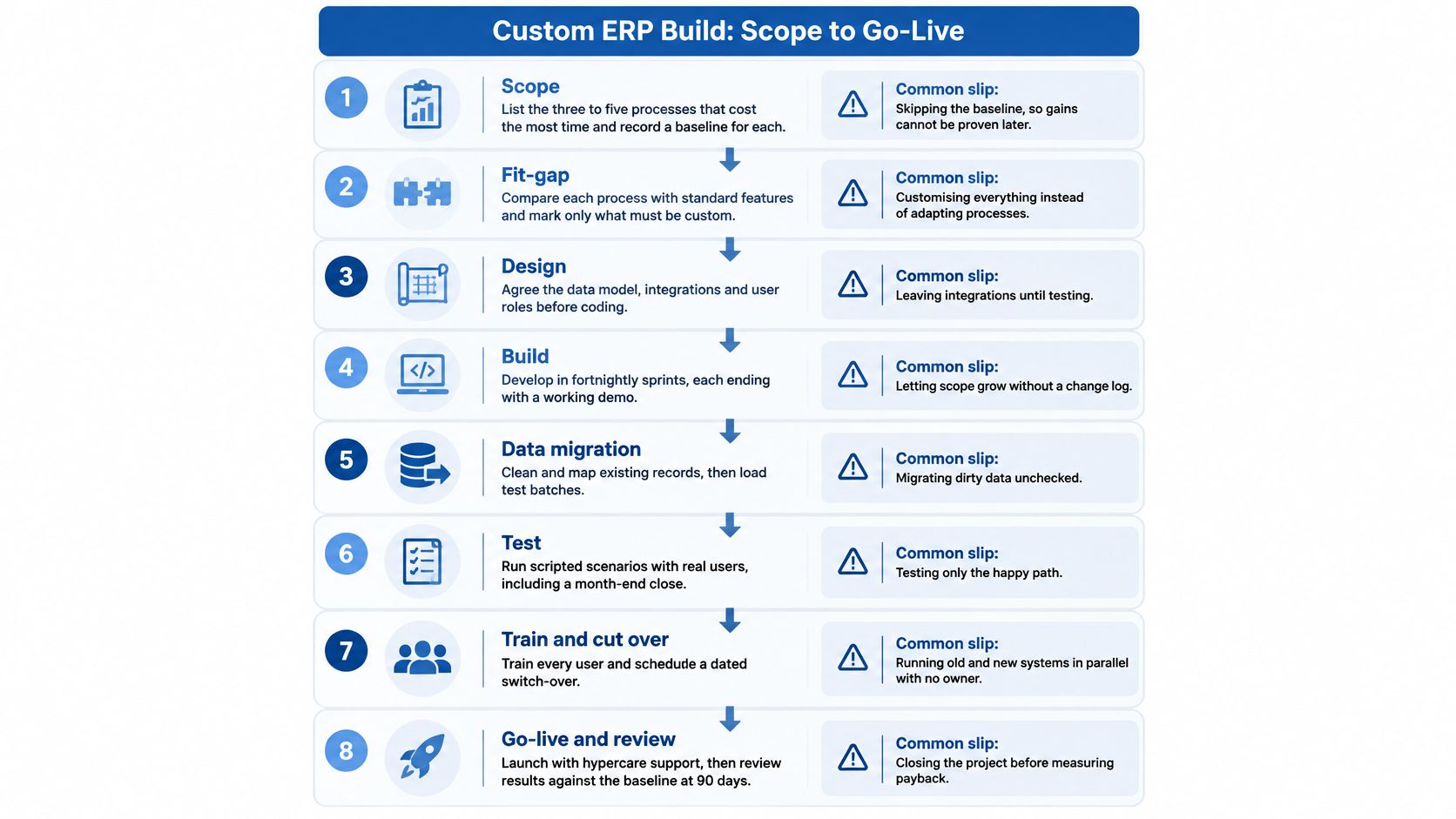
Scope the expensive processes. List the workflows consuming the most effort and establish the boundaries of the initial release. Include the trigger, final outcome and responsible business owner. The common slip is describing departmental wishes without identifying a complete operational result.
Map the work people actually perform. Use swimlane diagrams to show hand-offs between sales, operations and finance. Identify core objects such as customer, job, purchase order and invoice, then assign ownership of critical fields. Don't map an ideal process that ignores the spreadsheets people depend on.
Rank requirements and freeze the essentials. Separate must, should and could requirements, with an acceptance condition for each must. Compare requirements with existing platform features before approving custom work. The failure point is allowing stakeholder preferences to become launch blockers without a commercial reason.
Approve the design before coding. Agree the data model, role structure, approval flows, integrations and wireframes. Run threat modelling and a total-cost review alongside architecture decisions. Skipping sign-off creates avoidable rework when users finally see how their tasks fit together.
Build and release
Build in short, demonstrable increments. End each development cycle with working software that the product owner can inspect. Keep a change log showing the cost, delivery impact and approval for every scope change. Informal requests made during demos mustn't become unpriced commitments.
Integrate safely and rehearse migration. Use sandbox accounts and representative test records before connecting production systems. Clean and map source data, then repeat trial loads until reconciliation is reliable. Connecting live applications too early exposes real transactions to unfinished behaviour.
Test business outcomes, including exceptions. Combine unit, integration and user acceptance testing with realistic, appropriately protected data. Reconcile balances and transaction totals, and test rejected approvals, credits, cancellations and interrupted connections. A successful happy-path demonstration isn't acceptance evidence.
Pilot, train and control cutover. Start with a contained team or site, rehearse migration and assign rollback authority. For financially material workflows, use a time-bounded parallel run with a reconciliation owner. Set release thresholds for defects, performance, task completion and reconciliation variance before launch pressure builds.
After deployment, track completed critical workflows, exception queues, training completion and spreadsheet workarounds. A login count won't tell you whether people can finish their jobs.
Connecting monday.com, Accounting and Cloud Tools
Most of the operational value comes from reliable connections, not additional screens. A polished dashboard won't help if staff still copy approved hours into invoices or check stock availability by phone.
Keep the accounting platform as the authority for posted financial transactions. Use the custom layer to coordinate operational work, prepare validated transactions and present the status people need.
Connect monday.com deliberately
Use monday.com's API and webhooks to translate board activity into controlled ERP events. An approved variation might update a job budget; a completed billing review might prepare an invoice request.
Map fields using column IDs rather than display names, and validate board structure when configuration changes. Plan for API limits, queue work during busy periods and alert an owner when processing falls behind.
Don't treat every board edit as permission to alter financial records. Define the exact status transition, required fields and authorised role that make an event eligible for processing.
Make financial retries safe
Say a services firm sends approved time from monday.com to its accounting platform. The accounting platform accepts an invoice, but the acknowledgement never reaches the integration, so the event is retried.
Without a duplicate check, the customer could receive another invoice. Use a unique transaction key, persist the destination record ID and check processing state before repeating a write.
Integration safeguard: Assume messages can arrive late, arrive out of order or arrive again.
For complex hand-offs, platform integration services should cover mapping, error handling, monitoring and documentation, not merely establishing a connection.
Host and operate the connections
Choose hosting regions against customer contracts and data-residency expectations. Use a managed database, and ensure backup locations comply with those same commitments before selecting cross-region storage.
Scheduled CSV imports can bridge legacy tools without APIs, but they introduce delayed information and require explicit validation. Middleware suits simple triggers; complex commercial rules need visible ownership, version control and test coverage.
- Contract-test interfaces: Check required fields, response formats and error handling.
- Review failed events: Give an operator a working-day routine for resolving the queue.
- Maintain compatibility: Budget for API deprecations, authentication changes and connector upgrades.
Set log retention through your records and privacy requirements. Keep enough transaction evidence to investigate failures without retaining unnecessary personal data.
Security and Recovery Controls to Design In Early
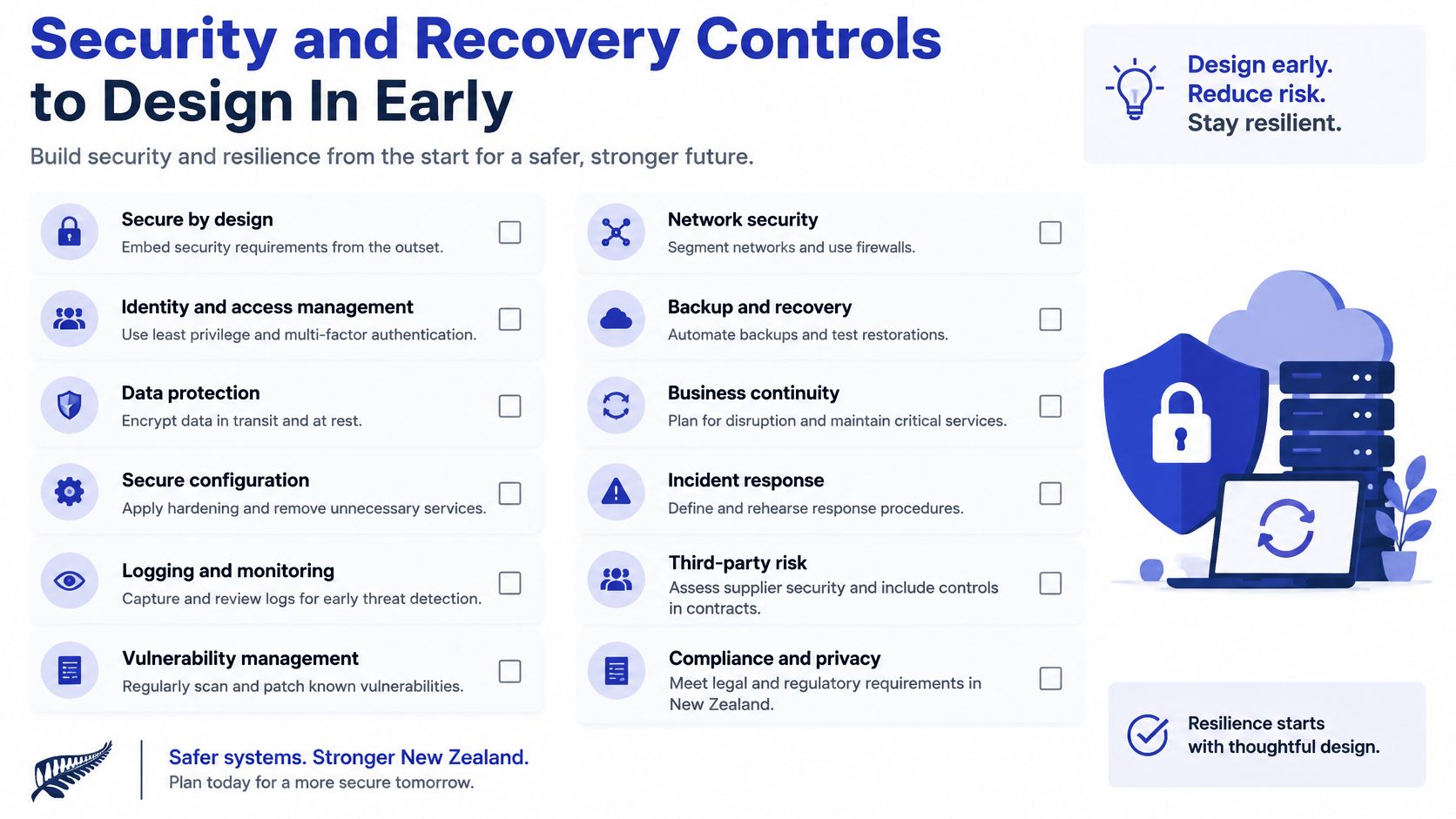
The National Cyber Security Centre's 2025 Cyber Threat Report states that 53% of SMEs experienced a cyber threat between January and June 2025, up from 36% in 2024. An ERP's access to customer information, supplier details and financial workflows makes security a business requirement.
Custom software isn't automatically safer than packaged software. Your team must design, operate and test the controls that protect those workflows.
Security and recovery controls ranked by business impact
| Control | Business impact | Relative effort |
|---|---|---|
| Role-based access and segregation of duties | Prevents an individual from independently creating and paying a supplier | Medium, designed during requirements |
| Dual approval for bank changes and payments | Reduces payment-redirection fraud risk | Low to medium |
| MFA on admin and finance accounts | Reduces account takeover from stolen credentials | Low |
| Immutable audit log | Preserves evidence for investigations and insurance claims | Medium |
| Encrypted, tested backups with restore drills | Supports recovery after ransomware or destructive changes | Medium, with recurring cost |
| Incident response runbook | Speeds initial containment and coordination | Low |
Match permissions to real jobs
Model roles such as bookkeeper, approver and owner rather than giving everyone administrator access. Require independent approval for supplier bank changes and payments above an agreed business threshold, with a separate verification channel for changed bank details.
Record who changed what, when and under which identity. Store audit records somewhere ordinary application users and application credentials can't rewrite them.
Prove recovery before relying on it
Set a recovery time objective for how long each process can be unavailable and a recovery point objective for how much recent data the business can lose. Warehouse operations may need different targets from management reporting.
Restore backups into an isolated environment on a scheduled basis. Verify that staff can use the recovered application, integrations reconnect correctly and restored records reconcile.
Use DevArmor's incident-response planning guidance to map incident escalation roles and responsibilities. Name who isolates compromised accounts, contacts the software partner, preserves evidence and informs the insurer.
Arrange cybersecurity support around these operational responsibilities. Backup completion notifications aren't proof that the business can recover.
How to Shortlist a Custom ERP Development Partner
A capable partner can explain the difficult parts of your workflow and show how they'll control them. A sales pitch promises flexibility without identifying where your business must make decisions.
Partner evaluation criteria and warning signs
| What to check | Green signal | Red flag |
|---|---|---|
| Proof of similar builds | Live references with comparable operational complexity, ideally in NZ or Australia | A portfolio described only in general terms |
| Discovery before pricing | Paid discovery producing a scoped plan and documented assumptions | A fixed price after an introductory call |
| Code ownership | Contract-defined rights, repository access and usable documentation | Code accessible only through the supplier |
| Support model | Named contact, severity definitions and response commitments | Ad hoc hours without service expectations |
| Security practice | Written development controls, MFA, permissions testing and penetration testing | No documented security approach |
| Integration experience | Demonstrable API work with monday.com and accounting platforms | Vague answers about retries and reconciliation |
Test delivery capability
Give shortlisted partners the same scripted workflow, including a rejected approval, corrected transaction and failed integration. Ask them to identify what they'd configure, what they'd build and what they'd leave alone.
A paid discovery engagement should produce useful artefacts you can retain, even if you don't proceed. A fixed-price proposal based on an introductory conversation offers little protection when migration quality and exception handling remain unknown.
If you're considering a staffing route, services such as HireDevelopers.com let you hire developers from latin america. Staff augmentation still leaves you responsible for product ownership, architecture, acceptance and support coordination; it isn't equivalent to buying a managed ERP outcome.
Check references and exit terms
Ask established customers what happened after the initial change request, how the team handled urgent defects and whether they'd hire the partner again. Request examples of handover documentation and support reporting, not just screenshots.
Before signing, settle IP assignment, hosting location, repository access, dependency licences and the exit plan. Consider source code escrow for business-critical systems, but don't confuse escrow with having the credentials and documentation needed to operate them.
This week, write a concise brief describing the bottleneck, current tools, target outcome and internal owner. Request comparable scoped proposals and arrange discovery; if work already runs on monday.com, start with a health check to identify the smallest useful automation.
Wisely offers bespoke software development, platform integration and post-go-live support, alongside monday.com implementation and health checks. Visit Wisely to discuss your highest-cost workflow and scope an initial ERP module with measurable acceptance criteria, operating costs and a clear funding decision before further development.