Treat rejected deliverables and lost footage as process failures before you blame creative talent. New Zealand's screen sector supports around 13,900 workers, many operating as contractors or self-employed specialists, according to MBIE's screen-sector background. In that project-based environment, an editor's memory isn't a dependable handover system.
A strong video post production checklist controls the work between creative decisions. It tells the assistant editor when a camera card can be released, the producer which cut is approved, and the finishing team which specifications govern the master.
I'd treat starting final grading or mixing before picture lock as the most expensive avoidable scheduling mistake in post. Change the duration afterwards and you can trigger a reconform, revised sound automation, graphics adjustments and another approval round.
Operating rule: Every stage needs a named owner, a verification record and a clear release condition before dependent work begins.
That doesn't mean every task runs sequentially. Sound preparation, look development and effects tests can happen during editorial. The distinction is between preparation you can revise and finishing work commissioned against an approved timeline.
Use the following stages as release gates, not merely reminders to tidy the edit before export.
1. Media Ingest, Verification and Backup
A folder full of playable clips isn't proof of a complete transfer. Start with a media manifest that records the project, camera identifier, card identifier, source location, destination and person responsible for ingest.
Use checksum-capable software such as ShotPut Pro or OffShoot to copy camera and field media. Compare source and destination checksums, retain the verification report, and preserve the original camera folder structure, including sidecar files.
The ingest station should make source media and verified storage easy to distinguish.

Release cards only after verification
For a documentary shoot, assign each camera card a unique identifier before copying. If a clip appears missing later, the editor should be able to trace it to its source card without guessing which drive contains the original.
- Verify the copy: Save successful checksum results and investigate mismatches before editorial uses the media.
- Separate the backup: Keep an additional verified copy outside the working storage's failure path.
- Check usability: Open representative picture and audio files, checking duration, playback and channel presence.
- Authorise reuse: Record who approved card formatting and where the verified copies reside.
Checksums establish copy integrity; they don't prove that the camera recorded usable sound or that every expected card arrived. Reconcile the manifest against camera and sound reports as well.
Define restore procedures alongside the storage design. An Archiware-based media archive workflow belongs in that planning discussion, but an archive job marked successful still needs a practical restore test.
Gate owner: The ingest operator signs the verification record, and the nominated production representative releases the source media.
2. Project Organisation and Naming Conventions
Say an agency needs a campaign master, a vertical cut and a localised version. If editors invent filenames independently, the producer can easily approve a review export that no longer matches the finishing timeline.
Create the project template before editing starts. Separate camera originals, production audio, proxies, project files, graphics, review exports, masters and delivery documentation, with permissions appropriate to each location.
The scale of supplier handoffs matters. MBIE's economic trends report records 1,602 post-production firms in 2021, compared with 243 in 2012, while noting that its dataset includes firms below official statistical significance thresholds.
Make the naming rule usable
Use a documented pattern such as Project_Deliverable_Language_Aspect_Version_Status. Keep version and approval status distinct: a newer file isn't automatically an approved file.
- Preserve source identity: Don't rename camera originals casually. Use bins, metadata and clip display names for editorial convenience.
- Keep versions explicit: Apply the same revision identifier to the timeline, review export and approval record.
- Record technical context: Store frame rate, timecode interpretation, proxy relationships and colour-management settings with the project.
- Separate approval from publishing: An approved master may still need platform derivatives and delivery checks.
For a documentary, organise editorial bins by sequence or reel while retaining searchable camera and interview metadata. For campaign work, organise deliverables by audience, language and destination rather than scattering them across editors' personal folders.
A MediaValet asset-management approach can support asset discovery and distribution, but the naming guide must still define what each field means.
Gate owner: The lead editor confirms that another team member can open the project, relink media and identify the current cut without verbal instructions.
3. Rough Cut, Fine Cut and Structured Review
A rough-cut review should answer whether the story works. It shouldn't become a debate about temporary colour, unfinished sound or placeholder lower thirds.
Set expectations in the review invitation. Identify what's ready for approval, what remains temporary and which decisions the client must make before editorial proceeds.
For a corporate interview film, the communications lead might consolidate factual corrections while the executive sponsor approves the message. The producer should resolve contradictory instructions before sending notes to the editor, not ask the editor to arbitrate internal politics.
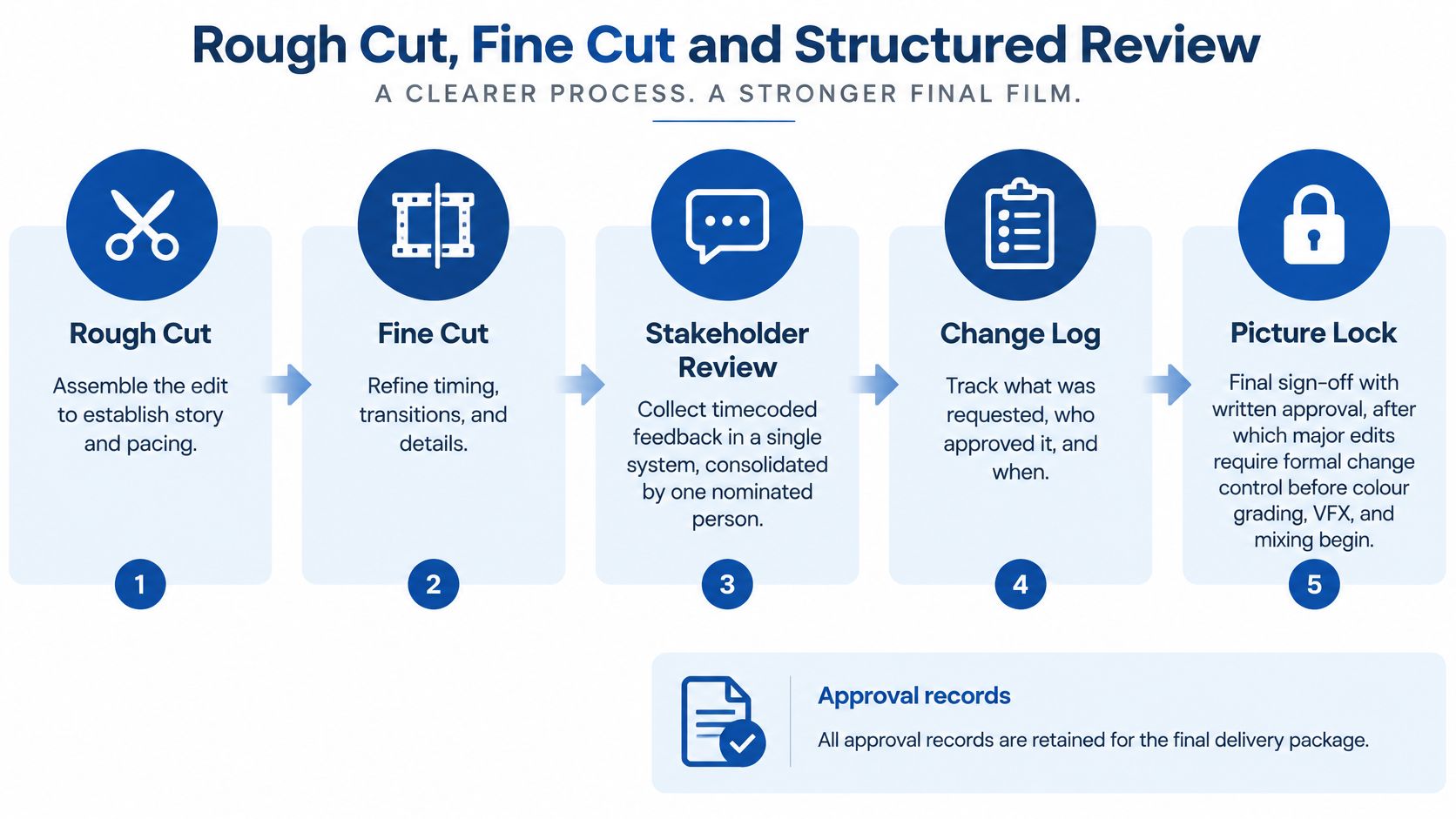
Use a visible approval sequence rather than a collection of disconnected review links.
Define what picture lock actually freezes
At fine cut, review shot selection, sequence order, duration, transitions and the placement of graphics. Separate mandatory corrections, creative preferences and out-of-scope requests so the producer can make sensible budget decisions.
Picture lock means the approved timing is stable enough for finishing. It doesn't mean the client has stopped having ideas.
Get written approval against a specific review version. Export a reference movie with visible timecode, then package the agreed turnover materials for sound, colour and effects.
A sound handoff may include an AAF, production audio, reference picture and notes on dialogue edits. A colour handoff may require XML or AAF, original media references, a reference export and a list of speed changes or unsupported effects.
Gate owner: The producer records picture-lock approval and authorises finishing. Any subsequent timing change becomes a documented change request with consequences for cost, schedule and downstream deliverables.
4. Colour Correction and Grading
Correction makes the shots belong together; grading gives them an intentional look. Don't use a creative LUT to conceal inconsistent exposure or an incorrect input transform.
A controlled grading environment makes those decisions more dependable.

Before the colourist starts, confirm the camera colour spaces, log encodings, intended working space and delivery colour space. In DaVinci Resolve, use an explicitly configured colour-managed workflow or a documented transform structure, rather than mixing automatic management with unexplained LUTs.
For a brand campaign combining interview footage and product shots, balance exposure and white balance first. Then compare brand colours and skin tones against approved references, remembering that a printed brand swatch isn't a complete specification for an emissive display.
Check the conform before the look
Compare the conformed timeline against the locked editorial reference. Inspect reframing, stabilisation, retimes, transitions and effects that may not translate cleanly from the editing application.
- Monitor deliberately: Grade on a calibrated reference display in a controlled, neutral environment.
- Document transforms: Record input interpretation, working space, output transform and LUT versions.
- Check destinations: Inspect SDR and HDR outputs separately where both are commissioned.
- Keep references: Save approved stills and grading notes for revisions and related campaign assets.
Consumer-device checks help expose practical viewing problems, but they don't replace the reference monitor. Don't chase every phone's appearance by repeatedly changing an otherwise correct master.
Use the following demonstration alongside the documented settings for your own project.
Gate owner: The colourist confirms the conform and output settings; the nominated creative approver signs off the look against the identified version.
5. Audio Editing, Mixing and Loudness Compliance
A mix can sound balanced in the suite and still fail delivery. Loudness compliance is a measured requirement, not a judgement based on the monitor volume knob.
Get the destination's current audio specification before mixing. Establish the required channel layout, integrated or dialogue-gated measurement method, loudness tolerance, true-peak ceiling and any requirements for stems or alternate mixes.
Separate intelligibility from compliance
Clean dialogue edits, repair distracting noise and smooth room-tone transitions before balancing music and effects. Tools such as iZotope RX can help with restoration, but aggressive processing can introduce watery artefacts that are harder to tolerate than a little consistent background noise.
If you need to compare restoration and mixing tools, find software to finish raw recordings against the actual problems in your source audio. Don't choose a processing chain just because it offers more automatic controls.
- Measure the programme: Use a LUFS and true-peak meter configured for the delivery specification.
- Use the correct framework: Apply EBU R128 or ITU-R BS.1770-based measurement where the destination calls for it, rather than assuming every platform uses an identical target.
- Check channel mapping: Audition the exported channels and confirm labels match their contents.
- Prepare localisation assets: Supply dialogue, music and effects stems when the agreed delivery package requires them.
For a corporate film destined for both an event venue and online playback, create destination-specific mixes if different dynamics are needed. Don't flatten the main mix indiscriminately to compensate for an unknown playback system.
Music clearance should already cover the intended use, territory and versions. A late music replacement can change edit points as well as the mix.
Gate owner: The mixer supplies the compliance results, and the producer confirms that approved music and audio rights match the delivery scope.
6. Visual Effects, Motion Graphics and Titles Review
A misspelt job title is still a delivery defect, even when the animation looks excellent. Review graphics as content, timing and technical integration, not just decoration.
For an explainer with localised versions, build approved templates for type, colour, lower thirds and animation behaviour. Keep editable text separate from rendered backgrounds where practical, so a translation change doesn't require rebuilding the whole sequence.
Approve the plate, then the finished shot
Track effects shots with a shot identifier, source version, frame range, handles, review status and delivery format. Supply the vendor with the required colour-space information and a reference showing the intended composition.
Review work-in-progress effects early enough to catch the wrong interpretation. Reserve final approval for the actual shot integrated into the conformed timeline, where adjacent edits, colour and motion can expose problems hidden in an isolated preview.
- Proofread against authority: Compare names, claims, prices and legal wording with the approved script or client-supplied copy.
- Test every composition: Check horizontal, square and vertical layouts separately rather than trusting automatic cropping.
- Check legibility: Review type size, contrast, display duration and interactions with captions.
- Retain licence evidence: Store font, stock, illustration and template permissions with the asset register.
If external motion graphics services are involved, specify editable-source delivery, render settings and revision ownership at the outset. A finished movie alone may be sufficient for a standalone spot, but it's a poor handover when the client expects regular text updates.
Approval boundary: An approved animation style doesn't approve the spelling, claims or timing in every rendered version.
Gate owner: The producer verifies copy and rights, the brand approver accepts presentation, and the finishing editor confirms that the approved renders are in the master timeline.
7. Version Control and Approval Workflow
Approval should identify a file, not a feeling. A message saying the video looks good is ambiguous if the reviewer watched an older export or a cached link.
Maintain a deliverable register that connects each requested output to its timeline version, review file, approver, approval status and final master. Mark superseded versions clearly and remove them from the active approval queue without destroying the audit trail.
For an agency campaign, the client's brand manager may approve creative content while legal approves claims. Neither approval substitutes for the other, and the producer needs to see both before authorising release.
Control access as carefully as revisions
The National Cyber Security Centre's 2025 threat report recorded 331 incidents of potential national significance, including 137 linked to criminal or financially motivated actors. Those are national figures, not a measure of studio incidents, but they make recovery and access controls a sensible operational priority.
- Restrict visibility: Give reviewers access only to the projects and versions they need.
- Protect accounts: Require MFA on storage, review and transfer platforms.
- Manage external copies: Use watermarks and download restrictions where supported and appropriate.
- Close access: Remove departing freelancers and expired review links through documented offboarding.
A PageProof-based approval workflow can help structure review, but the producer must still define approval authority and what constitutes a valid sign-off.
Keep recovery controls separate from revision history. Cloud sync can propagate deletion or corruption, so maintain protected backups and test restoration against defined recovery-point and recovery-time objectives.
Gate owner: The producer confirms approvals against exact versions, while the designated system owner verifies permissions and retention before final release.
8. Quality Control, Export and Delivery Compliance
QC the exported file, not just the timeline. Rendering, encoding, audio mapping and caption packaging can introduce errors after the creative work has been approved.
Build the delivery checklist from the recipient's specification. Include resolution, frame rate, aspect ratio, codec, bitrate, colour signalling, channel layout, loudness, captions, metadata and naming.
A dedicated review setup helps the operator inspect the actual master rather than the edit session.

Make accessibility a release condition
Caption files need human review, not merely successful generation. The Spinoff's reporting on caption access describes TVNZ's difficulties with automated recognition of New Zealand accents, Māori-language speech and specialist terminology.
For a public-information video, approve captions before final sign-off, verify names and terminology with a competent reviewer, and test timing and display in the destination player. Decide whether visually important information also needs audio description.
- Run technical QC: Use automated checks for detectable specification failures, then review the complete exported programme manually.
- Inspect picture and sound: Check flash frames, offline media, graphics, credits, sync, channel mapping and the end of the file.
- Verify transfer integrity: Compare checksums at delivery where the receiving workflow supports it.
- Archive the evidence: Keep approved masters, caption files, project dependencies, rights records and QC reports together.
For sensitive studio content, align storage, transfer, access logging and supplier handling with applicable TPN requirements and contractual controls. Encryption alone doesn't establish compliance, and a checklist doesn't replace a formal security assessment.
Gate owner: The QC operator records the result, the producer authorises release, and the recipient's acceptance is logged against the delivered version.
The Video Post Production Checklist at a Glance
| Stage | Core Goal | Key Tools & Standards | Biggest Risk If Skipped |
|---|---|---|---|
| Media Ingest, Verification and Backup | Copy and verify media, then create redundant backups | MD5 or xxHash checksums, ingest logs, 3-2-1 backup rule, Silverstack, ShotPut Pro, TPN guidance | Lost or corrupted footage with no reliable audit trail |
| Project Organisation and Naming Conventions | Structure folders, bins, and filenames for efficient collaboration | Folder templates, naming rules, metadata, Avid Media Composer, Adobe Premiere Pro | Missing assets, handover errors, and difficult re-edits |
| Rough Cut, Fine Cut and Structured Review | Refine the edit and secure approval at picture lock | Timecoded review, change logs, Frame.io, written sign-off | Costly late changes to grading, VFX, and mixing |
| Colour Correction and Grading | Match footage and create a consistent creative look | Calibrated monitors, colour spaces, LUTs, DaVinci Resolve, ACES | Inconsistent or technically unsuitable colour across deliverables |
| Audio Editing, Mixing and Loudness Compliance | Clean and balance audio to meet delivery requirements | LUFS and true-peak meters, EBU R128, ATSC A/85, audio stems, Dolby formats | Rejected deliverables or inconsistent, unclear playback |
| Visual Effects, Motion Graphics and Titles Review | Create and approve graphics, effects, and on-screen text | Brand templates, safe-area checks, licence tracking, After Effects, Nuke | Expensive rework, clipped graphics, or unlicensed assets |
| Version Control and Approval Workflow | Track revisions and record approvals against specific versions | Version numbering, approval gates, change logs, Frame.io, access controls | Wrong or unapproved version delivered |
| Quality Control, Export and Delivery Compliance | Validate, securely deliver, and archive final files | Automated QC, manual review, delivery specifications, TPN guidance | Rejected files, security breaches, or damaged client trust |
Turn the Checklist Into a Pipeline Your Team Runs Every Time
A checklist works when people can see what's blocked, who owns the next decision and what evidence allows work to proceed. Put each stage into the work-management system your team uses, with required fields for the owner, source version, verification result, approval and downstream dependency.
Don't automate an unclear process. Agree what picture lock means, who can approve a change and which delivery requirements take precedence before configuring notifications or status changes.
Build gates around evidence
Start by converting the stages into explicit release conditions. Verified ingest needs a manifest and checksum report; finishing needs an approved reference; delivery needs a passed QC record and an authorised master.
Keep conditional branches for jobs that differ. A short internal training video won't need the same effects turnover as a studio production, but both need recoverable media, controlled versions and an accountable release decision.
The RenderIO video automation walkthrough provides another perspective on connecting production tasks. Apply automation to repeatable actions such as job creation, review routing and archive triggers, while keeping human approval for creative acceptance and exceptions.
Automate the handoff only after you've defined what a successful handoff contains.
Studios and their supply chain partners also face formal security expectations. We're accredited to conduct TPN assessments for studios including Disney, Netflix, Sony, Paramount, Warner Bros and Universal; that credential should not be confused with automatic approval of any individual workflow.
For a confidential Media & Entertainment client, we took the business from non-compliant to TPN Registered in six weeks, using a full assessment, gap analysis and remediation plan. That's a specific completed engagement, not a promised timetable for every studio.
Check the infrastructure behind the workflow
We offer scalable media archiving and data management with Archiware P5, optimised for high-volume production and post-production workflows. We can also assess your current technology stack and identify exactly what needs to change, including the dependencies between storage, permissions, recovery and secure delivery.
Before the next deadline, select a completed project and trace it from source card to accepted master. Identify every point where someone relied on a private message, an untested backup or an approval that wasn't tied to a version.
Book a scoping call with those gaps in hand. Benchmark the pipeline against this checklist, assign the remediation work and test the revised process before another delivery depends on it.
We help production teams connect documented workflows, secure content handling and recoverable media storage from ingest through delivery. Visit Wisely to book a scoping call and assess your post-production pipeline before your next delivery deadline.