Monday morning starts with a coffee, an open Xero file, and a queue that somehow grew while the business was closed. Bank transactions need matching, supplier invoices are scattered through email, receipts sit in a van or handbag, and someone has entered a customer twice because the job system and accounting file don't share information.
For many owner-operators, the first part of the week disappears into reconciliation before any useful financial review begins. The answer isn't to add another app because its feature list looks impressive. The practical question is which Xero integrations that save time remove repeated work from a real New Zealand workflow, and which ones just move the admin somewhere else.
Xero's own New Zealand research gives that question useful context. Its 2025 report with the New Zealand Institute of Economic Research modelled productivity returns of $2.40 to $3.10 for every $1 spent when small and medium-sized businesses accelerate digitalisation, with a projected $8.6 billion boost to New Zealand GDP in 2025. The relevant point for a small business isn't the national headline. It's whether connected tools remove manual invoicing, reconciliation, approvals, and reporting from your week. (Xero and NZIER productivity report)
The Monday Morning Reconciliation Trap
At 8.15am, an owner opens Xero and finds a queue rather than a clear view of the business. Some payments match invoices. Others need investigation. A supplier PDF is sitting in an inbox nobody checks consistently, receipts are missing, and a card transaction has no useful description. After checking online banking, searching email, photographing paper receipts, and rekeying supplier details, the morning has become bookkeeping instead of management.
The same four tasks appear repeatedly:
- Bank matching: Identify the invoice or bill linked to each imported transaction.
- Receipt chasing: Ask staff or contractors to provide purchase records.
- Data re-entry: Type supplier, customer, invoice, and payment details into multiple systems.
- Exception handling: Resolve duplicates, vague descriptions, incorrect GST treatment, and unmatched payments.
Automation reduces the first three tasks most reliably. Exceptions still require judgement. A bank feed can import a transaction, but it cannot decide whether an unclear payment is stock, a subcontractor cost, or a personal expense without rules, supplier history, or human review.
Practical rule: Measure hours spent on exceptions, not the number of connected apps. An integration earns its place when it removes a repeated decision or manual entry from the weekly process.
A better Monday has a controlled flow. Bank data reaches Xero regularly, receipts move from the point of purchase into a review queue, and payroll information does not need to be typed into the ledger after every pay run. Xero reports that users can save 5.5 hours a week through bank feeds and automated transaction matching. The practical gain comes from reducing manual matching, checking, and re-entry, rather than importing transactions faster. (Xero NZ bank feeds)
The same principle applies when businesses automate payment reconciliation. Routine entries can process automatically, while unusual items move to a clearly owned exception queue. That control matters more than claiming the ledger can run without oversight.
Rank integrations by weekly hours reclaimed, setup friction, and fit for the business. A tool that saves a few minutes daily may beat an elaborate connector that creates another review queue. Feature breadth is secondary to measurable admin reduction.
What Xero Integrations Do Under the Hood
An integration connects Xero with another system through authorised API requests. It can read records, write updates, or respond to an event in the connected application. A point-of-sale sale, a new CRM customer, or a bank transaction can then pass into Xero without staff copying the record manually.
The direction of that data flow determines how much admin disappears.
One-way sync sends information into one system. A bank feed is the familiar example: the bank supplies transaction data, and Xero presents it for matching and coding. Two-way sync lets both systems send and receive updates. A job-management tool can create a customer in Xero, while an updated contact or invoice status can return to the job system.
The bank-feed sequence is straightforward:
- The bank records a transaction.
- The connection passes transaction data to Xero.
- Xero creates a statement line for review.
- A match, bank rule, or coding decision connects it to the right invoice, bill, or account.
- The user reviews exceptions instead of re-entering every line.
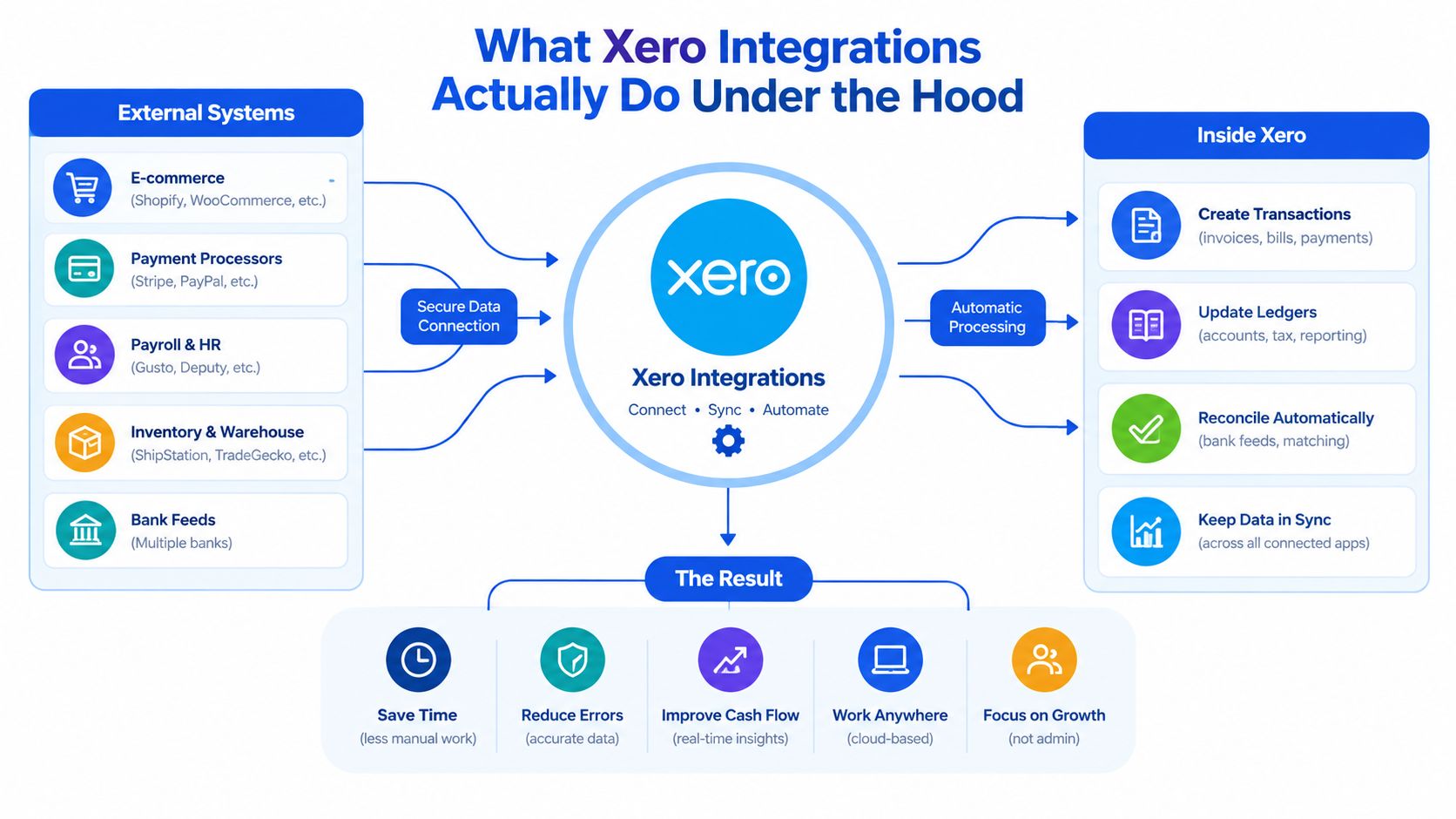
Two-way synchronisation tends to reclaim more time when the same information belongs in both systems. Without it, staff may enter a customer in a CRM, copy that customer into Xero, create an invoice in one platform, and repeat the work in the other. With accurate field mapping, the task happens once and the update travels.
Document capture is not the same as end-to-end processing. The Loopfour guide to invoice automation explains that distinction. During implementation, confirm whether the connector sends complete, correctly mapped records or only produces a preview that still needs manual entry.
The technical checks that affect real time savings
Most modern Xero connections use OAuth 2.0 for authorisation. Users do not give the integration their banking password. They grant defined permissions, and the connector receives access tokens for approved API calls.
That setup still needs monitoring. Xero and the connected platform may impose rate limits, permissions can change, and token refreshes can fail unnoticed. A workflow that passed testing can stop sending records, leaving the team to find the gap during month-end processing.
Before approving an integration, check:
- Direction: Does data move one way or both ways?
- Ownership: Who receives failed-sync alerts?
- Mapping: Are contacts, tax rates, accounts, tracking categories, and statuses aligned?
- Recovery: Can the team identify and safely replay a failed transaction?
- Scope: Does the plan include the API permissions and features the workflow requires?
For work-management and accounting connections, document each handoff before configuring the tool. A monday.com and Xero integration overview can help clarify how contacts, status changes, and draft invoices should remain aligned, rather than leaving staff to export and re-enter reports. The test is practical: measure the hours removed from the weekly process and the time spent handling exceptions.
Four NZ-Validated Automations That Reclaim Hours
The best integration is the one that removes a recurring task from the weekly workload. This ranking puts measured time recovery ahead of interface design or novelty. Xero describes app connections that can sync sales, fees, payouts, bills, receipts, and invoices, while automated matching can reduce manual work substantially in suitable workflows. The result depends on transaction quality, account mapping, and exception handling, so treat it as a workflow outcome rather than a universal promise. (Xero NZ app integrations)
| Integration | Task removed | Weekly hours saved | Setup effort |
|---|---|---|---|
| Bank feeds with smart coding | Manual transaction import, repeated matching, and re-entry | Xero reports 5.5 hours a week with bank feeds and automated matching | Low to moderate |
| Receipt capture with Hubdoc or Dext | Manual receipt filing and supplier bill data entry | Qualitative saving depends on invoice volume and review quality | Moderate |
| Payroll with Smartly or PaySauce | Re-entering payroll information and maintaining related ledger entries | Qualitative saving depends on pay-run complexity | Moderate to high |
| Job management or CRM sync with ServiceM8 or Tradify | Duplicate customer, job, and invoice entry | Qualitative saving depends on job volume and system design | Moderate |
1. Bank feeds with smart coding
Bank feeds usually deliver the strongest measured return because the task repeats throughout the week. Xero reports 5.5 hours a week saved through bank feeds and automated transaction matching, with imported lines matched against existing invoices, bills, and rules. The figure applies to suitable workflows, not every NZ business. (Xero NZ bank feeds)
Pair the feed with reviewed bank rules and bulk reconciliation. Recurring software subscriptions, rent, merchant fees, and regular supplier payments are good candidates for consistent coding. One-off or unclear payments should remain visible for review.
Check compatibility before relying on the connection. Confirm that the bank and account type support the feed, verify the starting date, and compare imported lines with the bank statement. A fast feed with weak coding rules shifts effort into corrections instead of removing it.
2. Receipt capture with Hubdoc or Dext
Receipt capture removes the search, filing, and basic typing involved in processing supplier documents. Staff can photograph a receipt or forward an invoice, then route the document into a review process for attachment to the relevant transaction or bill.
The saving comes from removing manual data entry, not from removing review. Assign responsibility for checking the supplier, date, amount, GST treatment, account code, and duplicate status. A captured document is not automatically a posted transaction. An inbox full of unreviewed receipts still creates admin.
Hubdoc and Dext suit different operating styles. Hubdoc can fit teams focused on document collection and storage. Dext can suit teams that need stronger extraction and approval workflows. Test representative NZ supplier documents first, especially invoices with multiple lines or unusual formats. If staff spend more time correcting extracted data than entering it, the chosen tool is not reclaiming hours.
3. Payroll through Smartly or PaySauce
Payroll integration earns its place when pay runs include changing hours, leave, deductions, several employees, and statutory obligations. Smartly or PaySauce can connect payroll processing with accounting, so the finance team does not rebuild payroll journals or carry payroll information into Xero by hand.
The setup requires more checking than a bank feed. Confirm the Xero plan, payroll permissions, employee records, pay codes, leave settings, KiwiSaver treatment, PAYE handling, and account mappings. Run the connection alongside the existing process before switching it on fully, then compare the journals and payment totals.
Payroll is the clearest example of an automation that needs an owner. A changed pay rate, new employee, leave adjustment, or altered account code must be reviewed by someone who understands the underlying payroll process. A scheduled pay run can save time, but an unchecked error can create more work than the original manual process.
4. Job management or CRM synchronisation
For NZ trades and service businesses, ServiceM8 and Tradify can remove duplicate customer and job entry. A job created in the operational system can carry customer details, labour or materials, and invoice information into Xero. That shortens the gap between completed work and billing.
This option ranks fourth because its weekly return varies sharply. A low-volume consultant may gain little, while a field-service business creating jobs every day can remove persistent rekeying and duplicate contacts. Measure the current weekly entry time before assuming the connection will pay off.
Start with one direction of flow and a narrow set of statuses. Decide when a job becomes a draft invoice, who approves it, and what happens when customer details change. Broader synchronisation can wait until the basic workflow produces reliable records and manageable exceptions.
Businesses comparing several connected workflows can use a structured workflow automation service to map manual handoffs before purchasing more software. Rank each proposed connection by hours reclaimed per week, then test the highest-return workflow first.
Matching the Right Integration to Your Business Shape
The right stack depends less on business size than on how transactions enter the business. A sole trader with a few monthly invoices doesn't need the same architecture as a retailer managing stock, online orders, card fees, supplier bills, and returns.
Score each candidate against five practical lenses:
- Transaction volume: How many bank, sales, purchase, and payment lines need review?
- Payroll status: Is payroll simple, or does it include changing rosters, leave, deductions, and multiple pay codes?
- Payment mix: Do customers pay by bank transfer, card, direct debit, online checkout, or several methods?
- Inventory depth: Are you selling a small range of services, or managing stock, variants, purchase orders, and returns?
- Team capacity: Who will review exceptions when the owner is away?
Four common business shapes
| Business profile | Top pick | Then layer | Expected weekly hours saved |
|---|---|---|---|
| Sole trader with straightforward expenses | Bank feeds and smart coding | Receipt capture if document chasing grows | Xero reports 5.5 hours a week for bank feeds and automated matching |
| Service-heavy professional firm | Bank feeds | Receipt capture, then payroll or CRM sync | Qualitative, depending on billing and team structure |
| Hospitality venue with complex payment flows | Bank feeds with carefully mapped payment accounts | Receipt capture, payroll, then payment-system integration | Qualitative, depending on settlement and payroll complexity |
| Hybrid stock-and-service operator | Bank feeds | Receipt capture, inventory or job-management sync, then payroll | Qualitative, depending on stock and transaction volume |
A professional services firm should generally begin with bank feeds and document capture before adding a CRM connection. The accounting workflow needs clean contacts, invoices, and expense records first. Firms comparing accounting platforms and service requirements may also find this professional services accounting guide useful when clarifying which system should remain the source of truth.
A trades business often gets more value from job-management synchronisation than from an advanced expense platform. A product retailer may need inventory and sales-channel integration before payroll automation, because incorrect stock and payout data can create more review work than manual entry did.
Over-buying usually happens when a business chooses a tool for a future operating model rather than its current bottleneck. Buy the connection that removes the task people repeat every week. Add complexity only after the team has a stable review habit.
For teams with several platforms, define the source of truth before connecting anything. A platform integration service can help document those ownership rules, especially where CRM, job management, inventory, and Xero all hold overlapping customer or invoice data.
A Realistic Rollout Plan for a Lean NZ Team
A small team can implement a focused stack in five working days, provided it doesn't activate every feature at once. The sequence should move from clean source data to controlled automation, then to exception testing.
Day one, clean the accounting foundation
Review the chart of accounts, GST codes, contact duplicates, bank accounts, and tracking categories. Audit bank-feed permissions and confirm which accounts should connect. If the ledger contains inconsistent historical coding, automation will reproduce that inconsistency.
Day two, configure documents
Connect Hubdoc or Dext, establish the submission route, and define who owns the review queue. Create rules for recurring suppliers, but keep uncertain categories out of automatic posting until someone has reviewed representative documents.
Day three, validate payroll
Connect Smartly or PaySauce and run a parallel pay cycle. Compare gross pay, deductions, leave, KiwiSaver, PAYE, and the resulting Xero journal against the existing process. Don't switch off the old check until the totals and account mappings agree.
Day four, connect operational data
Activate the job-management, CRM, inventory, or payment connection that addresses the next-largest manual handoff. Reconcile opening balances and decide whether the system creates drafts, approved invoices, contacts, or only transaction summaries.
Day five, stress-test exceptions
Use a representative batch of transactions, including a duplicate receipt, an unfamiliar supplier, a refund, an amended invoice, a failed payment, and a changed customer record. Review the exception reports and confirm that someone receives alerts when a sync fails.
Go-live signals
- Clean opening position: Bank, payroll, inventory, and job balances reconcile to the agreed starting point.
- Known ownership: Every review queue has a named person and a backup.
- Visible exceptions: Failed syncs and low-confidence records appear somewhere the team checks.
- No duplicate path: Staff know whether to email, photograph, upload, or forward each document.
- Documented rollback: The team knows how to pause a connection without deleting source records.
- Measured baseline: The business has recorded the manual time it expects the new workflow to remove.
Why Most Xero Integrations Quietly Fail to Save Time
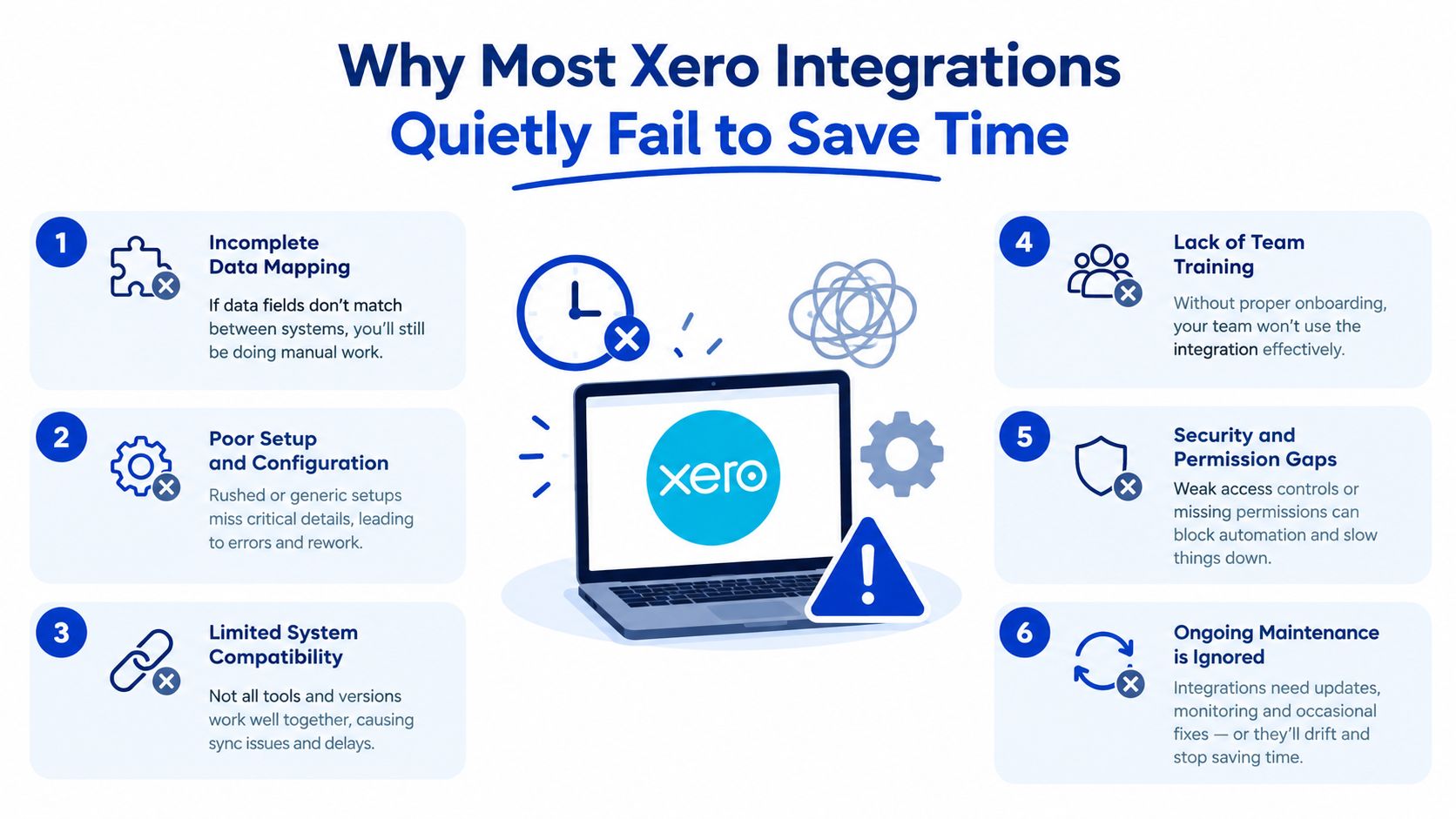
An integration can be technically connected and operationally useless. The most common failure is not a broken API. It's an unmanaged exception process that gradually turns automated work back into manual cleanup.
Categorisation drifts
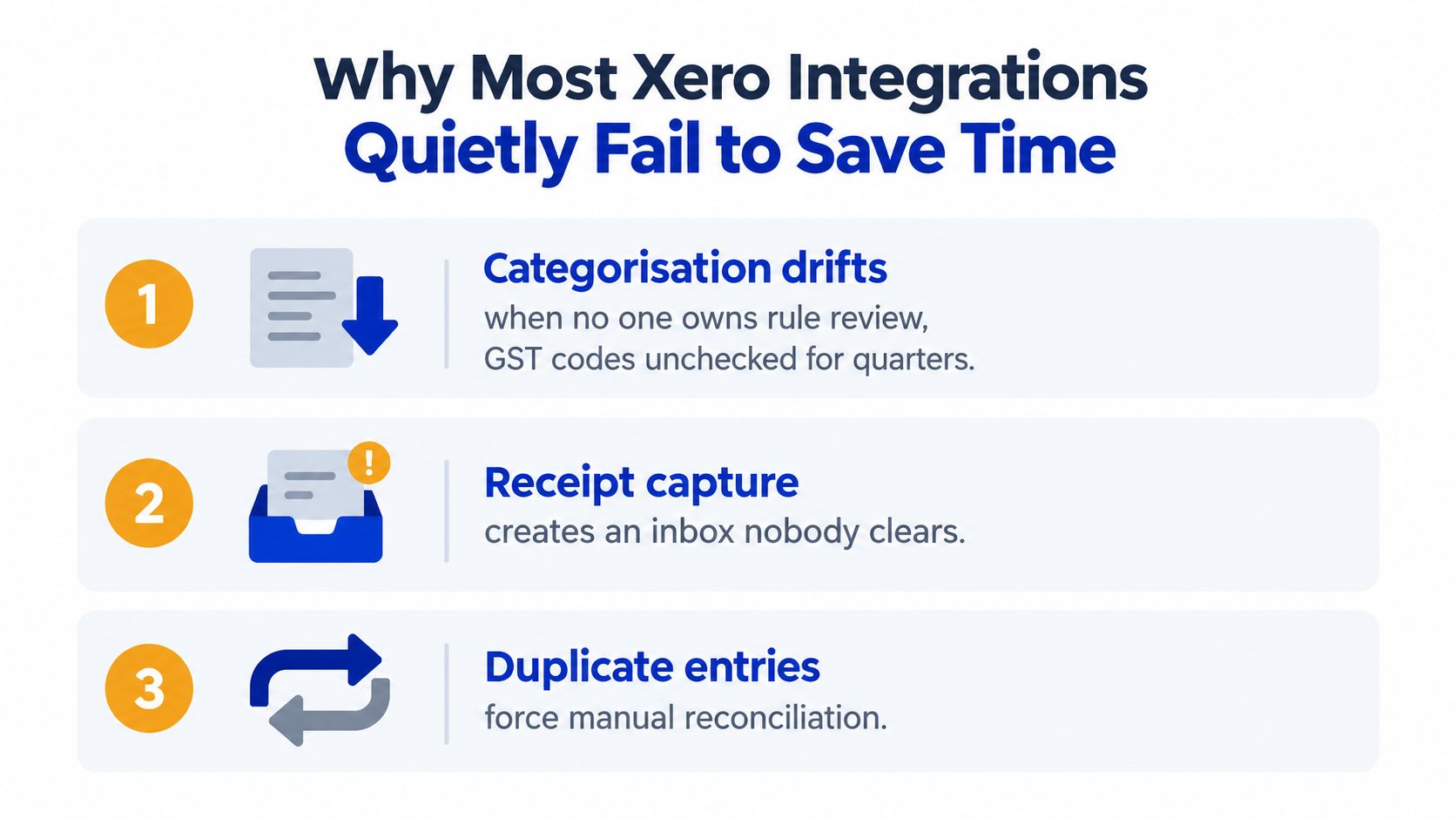
A bank rule may have been correct when it was created, but suppliers change names, payment descriptions change, and the chart of accounts evolves. GST treatment can also be overlooked when no one reviews the rules. The warning sign is a growing reconciliation queue containing transactions that used to process cleanly.
Assign a monthly rule owner. Review recurring categories, check GST treatment, and sample transactions against source documents. Keep a short change log so the bookkeeper knows why a rule was amended and when it should be reviewed again.
Receipt capture becomes another inbox
Receipt apps don't save time when employees send documents through several channels or nobody clears the review queue. The same receipt can arrive by email, mobile upload, and a forwarded attachment, leaving the team to identify and remove duplicates.
Choose one submission path for each document type. Set a review rhythm, make duplicate checking part of that review, and reject unclear documents rather than publishing them to the ledger. Capturing a receipt is only the first half of the workflow.
Payroll records lose alignment
Payroll connections can preserve last quarter's settings if nobody verifies new pay rates, employee details, leave balances, or account mappings. The warning sign is a payroll journal that technically imports but no longer agrees with the payroll report or the business's expectations.
Run a controlled comparison after material changes. Keep an approval step for new employees, altered rates, and unusual leave transactions. Payroll automation should remove re-entry, not remove accountability.
The integration saves time only when someone owns the exceptions.
Xero's research links app-connected digital tools with reduced manual work and stronger productivity outcomes, but a connection alone doesn't create that result. The team has to maintain the rules, clear the queues, and investigate failures before they reach month-end.
Turning Saved Hours Into Measurable Productivity Gains
Time saved has no business value if it disappears into a longer list of low-priority admin. Convert the result into a measured capacity decision.
Start with a normal week before changing the workflow. Record the time spent on bank reconciliation, receipt processing, payroll posting, customer duplication, and correction work. After go-live, record the same categories and separate routine processing from exceptions.
Use this simple method:
- Log the baseline: Track actual minutes for a representative week.
- Measure the new workflow: Record processing and exception time after the team settles into the connection.
- Calculate reclaimed capacity: Subtract the new total from the baseline, then multiply the weekly result by 52 weeks for an annual planning figure.
- Assign a use: Direct the recovered time to client work, quoting, cash-flow review, job follow-up, or a named growth project.
- Review at 90 days: Compare the time saved with subscription, implementation, correction, and training costs before adding another automation.
Xero's 2024 New Zealand productivity research used anonymised and aggregated data from more than 240,000 small business customers across New Zealand, Australia, and the United Kingdom. It reported that businesses readily adopting new technology had 120% higher revenue and 106% higher productivity than businesses that repeatedly failed to do so, while Xero and NZIER estimated that 20% uptake of cloud-based business technology could add $6.2 billion annually to the New Zealand economy. Those figures provide context, not a guarantee for an individual business. (Xero app productivity research)
The practical test is narrower. If bank feeds remove the largest recurring task, start there. If the team still spends its week chasing documents, add capture. If customer duplication delays billing, connect the operational system. Each step should have an owner, a baseline, and a defined use for the capacity it releases.
Wisely helps NZ businesses design and implement connected workflows across Xero, monday.com, finance, and operational systems, with support for integration, process automation, and ongoing optimisation. Visit Wisely to discuss which manual handoffs in your business should be removed first.