In 2024, 68% of New Zealand small and medium-sized businesses had no plans to evaluate or invest in artificial intelligence, according to an NZIER and Spark survey cited in the New Zealand Government's AI state of play report. Most mid-sized organisations aren't stuck waiting on futuristic automation. They're losing hours every week to basic system integration challenges between the CRM, accounting, payroll, and project platforms they already pay for.
Teams tend to treat a broken connection as an engineering fault, so they ask a developer to wire up an API and hope the spreadsheets disappear. That sequence fails almost every time. Connecting two messy systems doesn't clean up your operations; it moves contradictory customer records and half-baked financial figures around at machine speed.
Treating integration as a payback and data-ownership decision changes the order of work completely. Before anyone picks a connector or writes a line of code, you settle which connections pay back their full cost and name one person who owns every shared field.
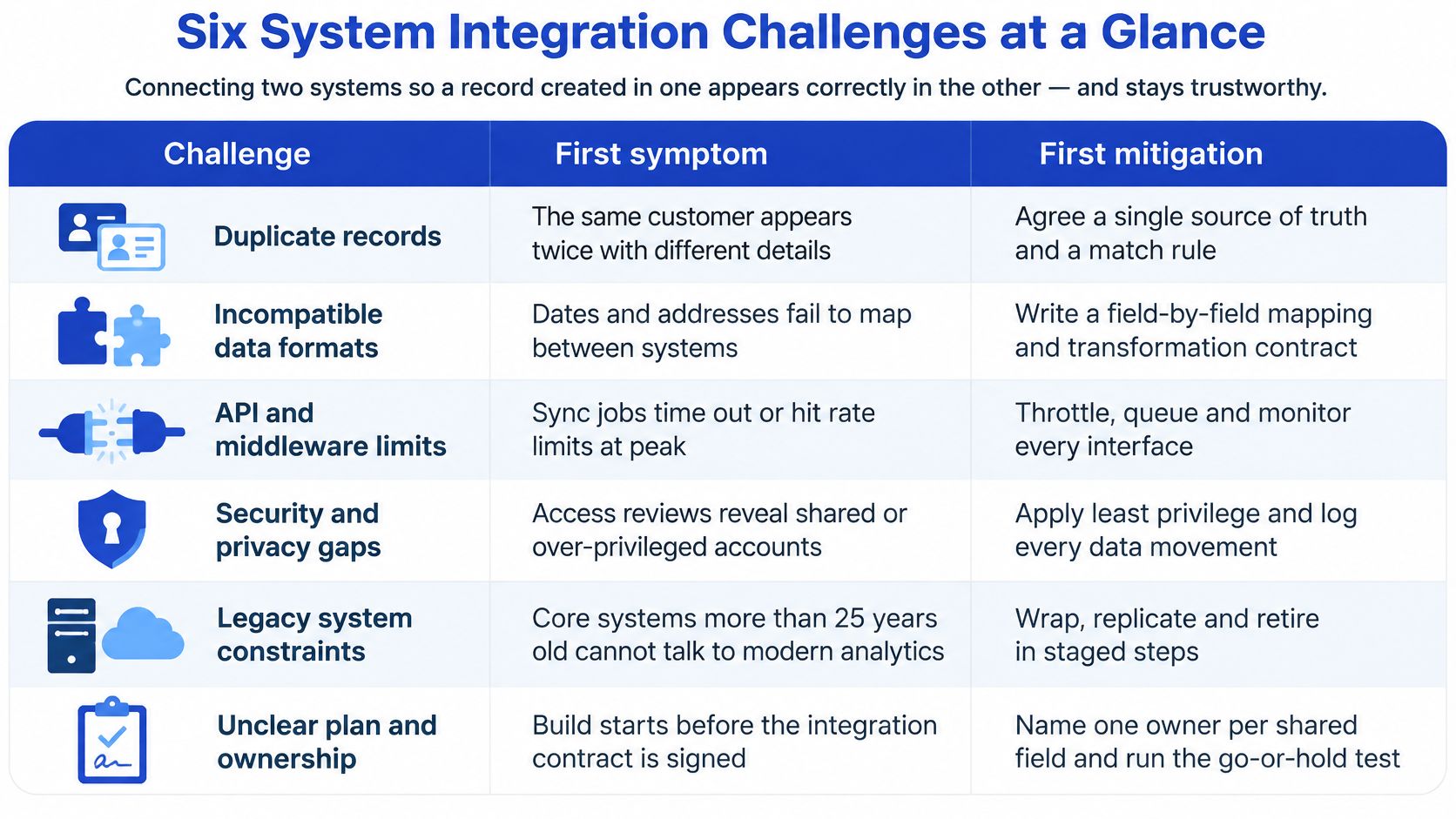
Six System Integration Challenges at a Glance
Most mid-sized firms don't suffer from a shortage of software. According to the MBIE 2020 Digital Index report, 14% of New Zealand businesses used no digital tools while 25% used eight or more different types, leaving the national baseline digital-capability score at 51 out of 100. Adoption is also lopsided across core functions, with 49% of businesses running cloud accounting software while only 43% had their own website.
That patchwork creates predictable friction the moment teams try to share information. The table below lays out the six integration failures that surface most often, the first symptom staff usually notice, and the first control to put in place.
| Challenge | Typical symptom | First mitigation |
|---|---|---|
| Data mapping | Same customer appears under two IDs | Assign one master identifier and a source-of-truth matrix |
| API incompatibility | Orders fail after a vendor update | Define an integration contract with versioning and error handling |
| Security and access | Former staff keep logins to connected tools | Review access quarterly and log every connection |
| Legacy systems | Old platform has no export or API | Wrap it with an adapter, then plan replacement |
| Change management | Staff keep using spreadsheets beside the new flow | Train users, run parallel tests and set a cutover date |
| Governance | Nobody can say which figure is correct | Name a business owner for each shared data field |
At its simplest, system integration connects two tools so a record created in one appears accurately in the other without anyone retyping it. Think of it as a shared interpreter standing between two departments that describe the same customer in different words. Sales logs a prospect by trading name and contact person, while finance tracks the legal entity and debtor number, so the interpreter translates both sides consistently every time a record moves.
The infographic below summarises these six failure points and their immediate fixes in one reference view.
Scoring Your Own Environment First
For a growing organisation, the question isn't whether you own enough cloud subscriptions. It's whether finance, CRM, project delivery, payroll, and management reporting exchange records you can trust without someone reconciling CSV exports every Friday afternoon. For a broader look at how connected tools reduce administrative drag, CEFCore outlines how integrated systems improve stewardship across operational teams.
Before booking any technical work, print the six rows above and score your own stack with your finance lead, operations manager, and IT contact. Mark every symptom your staff already complain about during monthly close or job handover. Start your plan with the challenge that shows up across the most workflows, which in mid-sized New Zealand businesses is almost always data mapping.
Deciding Which Integrations Are Worth Building
Technical feasibility is rarely the main barrier to connecting software. In the MBIE Business Digital Capability report, New Zealand businesses cite low expected return on investment (25%), upfront affordability (22%), insufficient skills (21%), and difficulty selecting the right tools (21%) as the main factors holding them back. Economic discipline, not API cleverness, decides whether an integration pays off.
| Criterion | Build a full integration when | Keep manual or phase when |
|---|---|---|
| Payback period | Under 12 months, based on measured hours and error costs | Benefit is unclear or payback is longer than the system is expected to last |
| Data criticality | Customer, payroll or financial records move daily | Data is reference-only or changes rarely |
| Implementation risk | Vendor provides a tested, maintained connector | Custom code is needed on a legacy system with no vendor support |
| Teams and partners affected | Three or more teams depend on the same records | One team owns the whole process end to end |
Building the Pre-Integration Business Case
Too many integration budgets compare software connector fees against a vague hope of saving time. A proper business case puts real hours and dollars on both sides of the ledger before anyone signs a statement of work.
Measure the cost of doing nothing across five concrete lines: weekly hours spent re-entering the same job or invoice details, monthly reconciliation time, reporting delays that stall leadership decisions, credit notes or rework caused by typing mistakes, and cash-flow drag from slow invoicing. Then stack that annual saving against the full lifecycle cost of the integration: middleware subscriptions, initial data clean-up and migration, staff training, ongoing support, and change management.
Practical rule: Automating an unclear process or linking two systems full of duplicate contacts doesn't speed up the business. It multiplies the clean-up work your finance and admin staff have to do every week.
If a workflow is still changing every month, or only moves twenty reference records a quarter, a disciplined spreadsheet import beats a live API integration every time. You avoid maintenance overhead while the team settles on a stable way of working.
Ranking Projects Without Chasing Shiny Connectors
Score every proposed connection against the four criteria in the table above rather than letting the loudest software vendor set your roadmap. A high-volume link between Xero, a CRM like HubSpot, and a job-management tool affects sales, delivery, and accounts every single day, so it usually earns a full build. By contrast, syncing a quarterly supplier price list used solely by procurement belongs in the keep manual column.
Watch out for the common edge case: a project that promises a fast payback on paper but scores poorly on implementation risk because it touches an undocumented on-premise database. I would never build that as a single big-bang release. Phase it by connecting one read-only workflow first, prove the numbers reconcile, and only fund the second phase once the team trusts the output.
At Wisely, we start this decision by assessing a customer's current technology stack and stating plainly what needs to change and what should stay untouched. Your goal at the end of this step is a single ranked sheet listing every candidate integration, each marked build, phase, or keep manual.
Mapping Data Between Systems Without Losing Meaning
Most integration failures happen on a whiteboard weeks before a developer writes a single transformation script. In its Digital Technologies Industry Transformation Plan future focus areas, MBIE notes that many New Zealand organisations still operate with low data maturity, with relatively few relying on data for senior-management or board decisions. When you connect tools without agreeing on definitions, pooled dashboards look real-time while hiding conflicting identifiers, duplicated accounts, and mismatched reporting periods.
| Field | CRM holds | Finance holds | Mapping rule |
|---|---|---|---|
| Customer ID | CUST-4082 (auto-generated contact key) |
ACC-00914 (debtor ledger code) |
Assign one master ID and store both as aliases |
| Revenue | Quoted value including GST | Invoiced value excluding GST | Map to invoiced value excluding GST and label the source |
| Project status | 'Complete' at handover | 'Closed' after payment | Use one status list with an owner for each change |
| Timestamp | Created in NZ time | Stored in UTC | Convert on ingestion and record the time zone |
Look closely at the revenue row. If a sales pipeline tool pushes quoted totals including GST into a reporting warehouse beside invoiced amounts excluding GST from Xero or MYOB, management sees a tidy chart that is 15% wrong on half its figures. For a practical breakdown of how teams structure shared pipelines cleanly, see Freeform Company on data integration.
Five Steps to Map Shared Fields
Follow this sequence before configuring any connector, middleware flow, or custom sync.
- Inventory every field crossing a system boundary. Don't just list "customer details" or "order data". Write down the exact column names, data types, and character limits in both systems so silent truncation never chops off a delivery address.
- Assign one named business owner per field. If sales and finance both think they can overwrite a client's trading name, records will ping-pong back and forth on every sync cycle. One role owns the definition and approves any schema change.
- Lock in a source-of-truth matrix. For each shared attribute, state which application wins when records disagree. Your CRM might own contact phone numbers while your accounting platform strictly owns credit terms and GST status.
- Write explicit transformation rules. Spell out currency codes, tax treatment, date formats, and time zones (such as converting New Zealand Daylight Time to UTC on ingestion). Ambiguity here creates subtle month-end cut-off errors where invoices dated at 11:30 pm NZST land in the next month's ledger.
- Validate at ingestion and quarantine bad payloads. Reject records missing a mandatory master ID or failing format checks, and route them to an exception queue instead of letting bad data corrupt downstream tables.
Pay special attention to one-to-many relationships, which trip up mid-sized service and wholesale firms constantly. Say a national retail client operates twelve regional branches: your CRM holds one parent company for account management, while finance maintains twelve separate billing entities with distinct purchase-order rules. Your mapping table needs an explicit parent-child link key rather than forcing a clumsy one-to-one match.
Measuring Data Quality Over Uptime
API uptime tells you the pipe is open, not that the water is clean. Track match rate (the share of incoming records linking cleanly to a master ID), duplicate rate, failed-message rate, and reconciliation age (how long an exception sits unresolved). You should also measure the percentage of critical fields that have a documented owner.
Written process manuals almost always miss the shortcuts staff invent under pressure. During the first days and weeks of an engagement, our team at Wisely embeds with the client's staff and maps actual workflows, including the bottlenecks and spreadsheet workarounds people rely on to get jobs out the door. Don't move to build until you hold a completed mapping sheet with one named owner and one written rule for every shared field.
Security, Privacy and Who Owns Bad Data
Many leadership teams assume integration security ends once IT turns on multi-factor authentication and hands out API keys. That assumption breaks down the moment an automated workflow misfires. When a misconfigured sync pushes the wrong tax code into payroll or overwrites a customer's bank details across three platforms, the core failure isn't a firewall breach; it's a governance gap.
An automated workflow moves bad payroll, customer, or financial data across your business faster than any person can spot the mistake and hit stop.
In its 2025-2029 Statement of Strategic Intentions, Stats NZ points to low interoperability, inconsistent data standards, and limited data-sharing frameworks as ongoing constraints on safe, efficient data sharing across agencies and sectors. Mid-sized commercial firms hit the exact same wall whenever data leaves a single department's control.

Crossing Organisational Boundaries
Picture a standard mid-sized NZ construction or services setup: a CRM feeds client and job details into accounting software, shares site schedules with external subcontractors, and exports compliance records to a government portal. No single vendor or internal team controls the entire chain. If a subcontractor updates a site record incorrectly or a third-party app changes its permission model, finger-pointing starts immediately unless your agreements name who diagnoses the fault, cleans up the records, and notifies affected parties.
Access sprawl creates a quieter version of the same risk. A classic edge case is a freelance project manager or external bookkeeper who keeps an active login or service token on a connected tool months after their contract wraps up. Without formal offboarding tied to every integrated platform, an unused account sits open as an unmonitored back door into finance and customer records.
Backing your integrations with structured managed cybersecurity controls closes those gaps, provided the human responsibilities are just as clear as the technical ones. At Wisely, we work alongside a client's internal IT person and agree the responsibility boundary in writing, so critical security tasks are never assumed by both parties or dropped by neither.
Pre-Go-Live Accountability Checklist
Before any live data moves across a new connection, run through this New Zealand compliance and governance checklist and assign a named sign-off to each line:
- Master data and validation ownership: Name the manager accountable for field rules, exception queues, and approving vendor schema updates before they hit production.
- Quarterly access reviews and least privilege: Restrict every user account and API token to the exact read or write permissions the workflow requires, and schedule quarterly audits to strip unused contractor and leaver access.
- Audit logs and incident response: Confirm that every automated create, update, and delete action writes to a tamper-evident log, backed by a written incident plan specifying who pauses the sync if bad data spreads.
- Data sovereignty and retention: Document which country hosts the primary platform and any middleware layer, confirm compliance with the New Zealand Privacy Act, and set automated retention periods so stale personal data isn't hoarded indefinitely.
- Breach responsibilities and human approval gates: Spell out who handles privacy breach notifications across vendors, and insert mandatory human approval steps before high-risk actions such as bank-account edits, bulk payroll runs, or credit-limit overrides.
Close this phase with a single accountability sign-off sheet recording the field owner, access reviewer, data hosting location, and human approval points for every active interface.
API Incompatibility and How to Test Interfaces
Think of an application programming interface (API) as a wall plug and socket. Two systems connect cleanly only when both sides agree on the exact pin layout (data shape), the safety earth (authentication method), and the voltage standard (API version). Change one pin without telling the other side, and the plug either won't fit or sparks in production.
In New Zealand's Strategy for a Digital Public Service, interoperability sits at the heart of modern integration, leaning on open, reusable APIs, shared standards, and built-in privacy controls to stop architectural fragmentation. Commercial software vendors don't always make life that tidy. Connections break because data models disagree, vendors hide key objects behind proprietary interfaces, an endpoint gets retired with minimal notice, an OAuth token expires without warning, or a software update turns an optional field into a mandatory one.
What Belongs in an Integration Contract
Never rely on informal Slack messages between developers to keep an interface alive. Put an integration contract in place before writing code, covering six essentials:
- Canonical data definitions: The agreed field names, types, allowed values, and master IDs from your mapping sheet.
- Authentication and token rotation: Whether the interface uses OAuth 2.0, scoped API keys, or mutual TLS, plus who refreshes expiring credentials before they lock out production.
- Versioning and deprecation rules: How both sides handle vendor API upgrades and how much notice triggers a staging test.
- Error-handling and retry behaviour: Exact rules for HTTP timeouts, exponential backoff, dead-letter queues, and alerting thresholds.
- Named endpoint ownership: One technical contact responsible for maintaining the connector and triaging failures.
- Audit and logging standards: Correlation IDs carried across every request so you can trace a single order from storefront to general ledger in minutes.
Whenever you have a choice, insist on published, versioned APIs over undocumented screen-scraping scripts or ad-hoc CSV drops onto shared folders. Screen-scrapers shatter every time a vendor tweaks a button label, and manual file drops fail the day someone goes on annual leave. When a vendor lacks a native connector and you need custom middleware, clean bespoke software development built around a strict contract saves you years of brittle patching.
Six Interface Tests Before Go-Live
Testing only the "happy path" with clean sample data is how half-built integrations wreck Monday morning operations. Run every new or updated interface against this six-case test matrix in a staging environment before cutting over.
| Test case | Expected result |
|---|---|
| Normal transaction | Record accepted and matched on the master ID |
| Duplicate retry from webhook | Receiver rejects the repeat using the unique message ID |
| Partial failure | Record is rolled back or queued in both systems, never half-saved |
| Revoked credential | Call fails with a clear alert, not a silent drop |
| Renamed or new mandatory field | Schema check blocks release before go-live |
| Peak-hour rate limit | Requests queue or back off, no orders lost |
Pay close attention to the second row. Webhooks frequently time out during busy periods and automatically resend the exact same payload seconds later. Unless the receiving system checks a unique message ID (making the endpoint idempotent), one customer order turns into two invoices and two warehouse pick slips before anyone notices.
Don't sign off a build until you have both a written integration contract and a completed test matrix showing pass evidence for all six failure scenarios.
Integration Architecture Patterns
Picking the right structural pattern matters just as much as writing clean field rules. Before committing to a toolset, weigh the four main approaches against the number of systems you run and how fast your records move. For additional background on how engineers weigh structural trade-offs across modern platforms, AppJet reviews common software architecture patterns and their scaling limits.
- Point-to-point links connect Application A directly to Application B. They're cheap and fast when you only have two tools, yet they turn into an unmanageable spider web as your stack grows because every new platform demands separate connectors to every existing one.
- A central hub or integration platform routes traffic through one shared middleware layer (using tools like Make, n8n, Zapier, or an enterprise iPaaS). Centralising mapping, authentication, and error logging here makes life far easier once three or more teams rely on the same customer or job records.
- Event-driven messaging flips the model: a source system publishes an event (such as "Order Dispatched") to a message broker, and any authorised downstream system subscribes and reacts in near real time. It handles high-volume stock and order surges cleanly, though it demands idempotent receivers and dead-letter queues so retried messages never get lost or duplicated.
- Scheduled batch exchange moves grouped records on a fixed timer, such as hourly or overnight. It's unfashionable in vendor sales pitches, yet it remains the safest, lowest-cost option for static reference tables, end-of-day reporting, and ageing platforms that lack real-time APIs.
Choosing a Pattern as Your Stack Grows
Say a mid-sized New Zealand retailer links its Shopify storefront straight to Xero. A single point-to-point connector handles daily sales postings without fuss. Twelve months later, the business adds an inventory system like Unleashed and a freight platform like Starshipit. Trying to wire point-to-point links between four systems creates six fragile interfaces to patch and monitor; moving to a central hub cuts maintenance cost and gives operations one dashboard for every failed sync.
Whichever pattern fits your current scale, the operational discipline stays identical: every connection still needs one named owner, documented error handling, and a passed test matrix before going live.
Legacy Systems and Moving Without Downtime
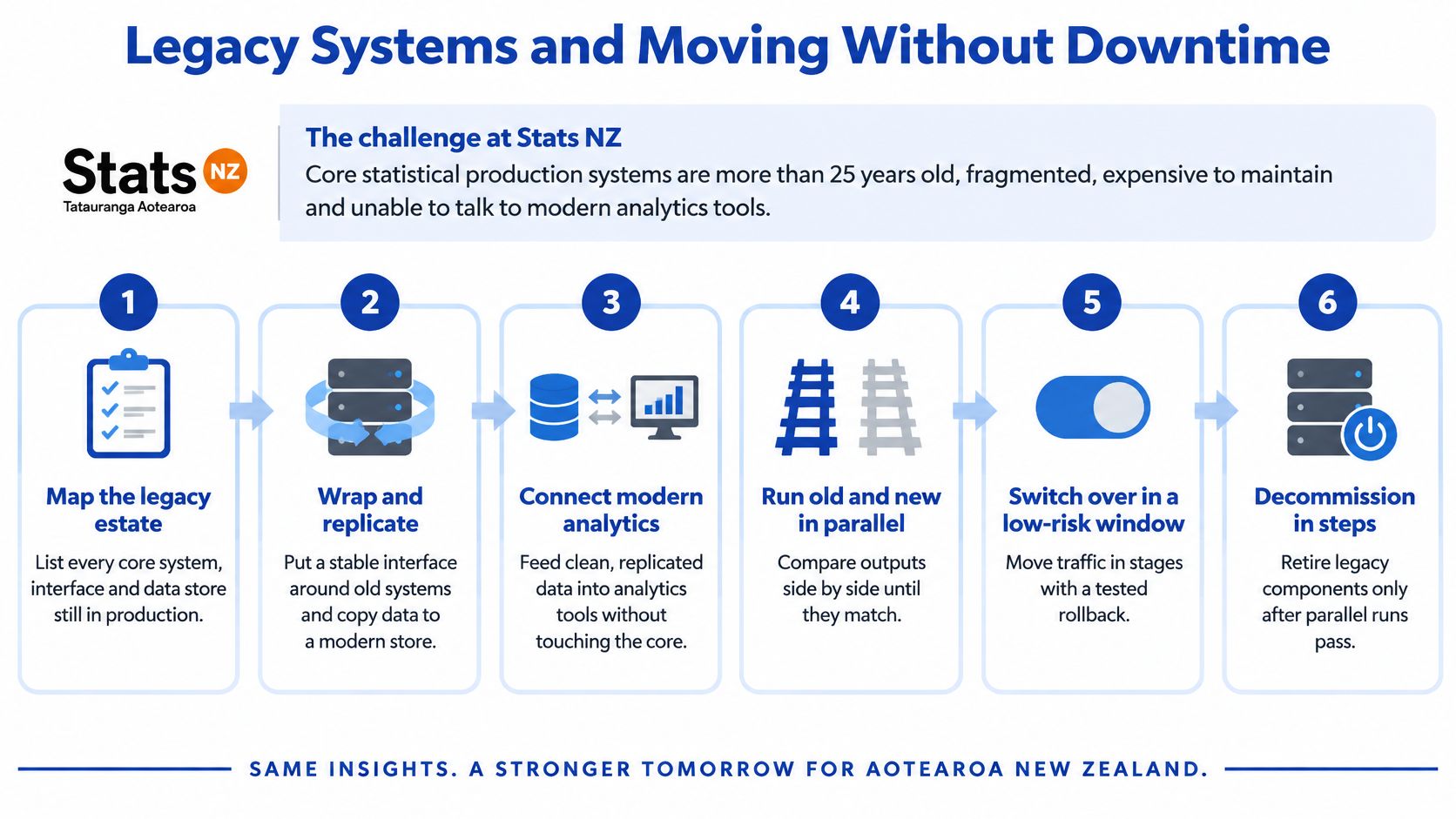
Ageing core platforms sit at the centre of the toughest integration projects in New Zealand. In its Measuring a Modern Economy detailed business case, Stats NZ reported that many of its core statistical production systems, including platforms supporting the Balance of Payments and the Consumer Price Index, are more than 25 years old. Those systems were described as outdated, fragmented, increasingly expensive to maintain, and unable to interoperate with modern data sources and analytics tools, driving duplicated work, slower statistical releases, and heavier reporting burdens for data suppliers.
Mid-sized businesses run into a smaller version of the exact same trap with 15-year-old on-premise ERPs, custom Access databases, or industry-specific job platforms that still run core billing. Bolting a flashy cloud dashboard directly onto an ageing database rarely delivers clean insight. Connectors don't fix mismatched data definitions; they copy decades of accumulated quirks into a newer screen.
The diagram below maps out a low-risk, six-stage sequence for modernising legacy systems without halting day-to-day operations.
Three Practical Paths for Ageing Software
You don't have to rip out a working core platform overnight just to connect modern reporting or CRM tools. Three proven patterns let you keep trading safely while reducing technical debt:
- Wrap with an adapter: Place a thin, modern API wrapper or read-only replica in front of the old database so cloud apps talk to the wrapper rather than hammering legacy tables directly.
- Run scheduled exports and imports: Where live two-way writes risk locking or corrupting an ageing database, move validated CSV or JSON batches overnight until the core platform is ready for replacement.
- Replace in controlled stages: Migrate one function at a time, starting with reporting or quoting, while keeping core ledger postings stable until parallel testing proves the new setup matches dollar for dollar.
At Wisely, we support the systems a client already runs and don't force a working environment onto a preferred stack just for the sake of change. The one exception we raise is software that its vendor no longer supports, because unsupported platforms stop receiving security patches and expose every connected tool in your network. When a move to the cloud does make financial sense, we usually run it in two steps: lift and shift to supported infrastructure first, then redesign individual workloads where the payback justifies the effort.
Don't quietly drop a quirky legacy field just because your new SaaS platform lacks an obvious box for it. Keep the field with a documented definition until finance and operations confirm nobody relies on it for audit or compliance reporting.
Five Staged Steps With Rollback Points
Under our change enablement practice, server moves, licence changes, new applications, and firmware updates are planned, scheduled, and reversible. Use this five-step sequence so you always hold a clean exit route if a stage stumbles:
- Map what the legacy system holds and who relies on it. Catalogue every database table, custom report, and downstream spreadsheet feeding off the old platform before touching a single setting.
- Stabilise the boundary with an adapter or scheduled export. Isolate modern cloud tools from legacy quirks so you can test transformations safely without touching live production records.
- Run old and new systems in parallel for one full reporting cycle. Compare invoices, stock counts, and GST returns side by side; your rollback point here is simple because the legacy platform stays authoritative until every variance is explained.
- Lift and shift to supported infrastructure during a low-risk window. Move the stabilised environment onto supported servers or cloud hosting with a tested revert plan ready to restore routing if performance dips.
- Redesign high-value workloads and decommission in steps. Power down old interfaces and legacy modules only after parallel checks pass and staff complete cutover training.
For a practical walkthrough of how teams apply staged modernisation patterns without risking live business continuity, watch the short overview below.
Confirm the Integration Plan Before You Build
Enthusiasm kills more integration budgets than technical debt. Once leadership approves a new CRM or ERP, everyone wants live connections running by the end of the month, so teams skip field ownership, wave through half-tested webhooks, and spend the next year paying developers to untangle duplicate invoices.
Apply a strict go-or-hold test before a single hour of build time is billed. Proceed to build only when all six conditions in the checklist below are ticked in writing:
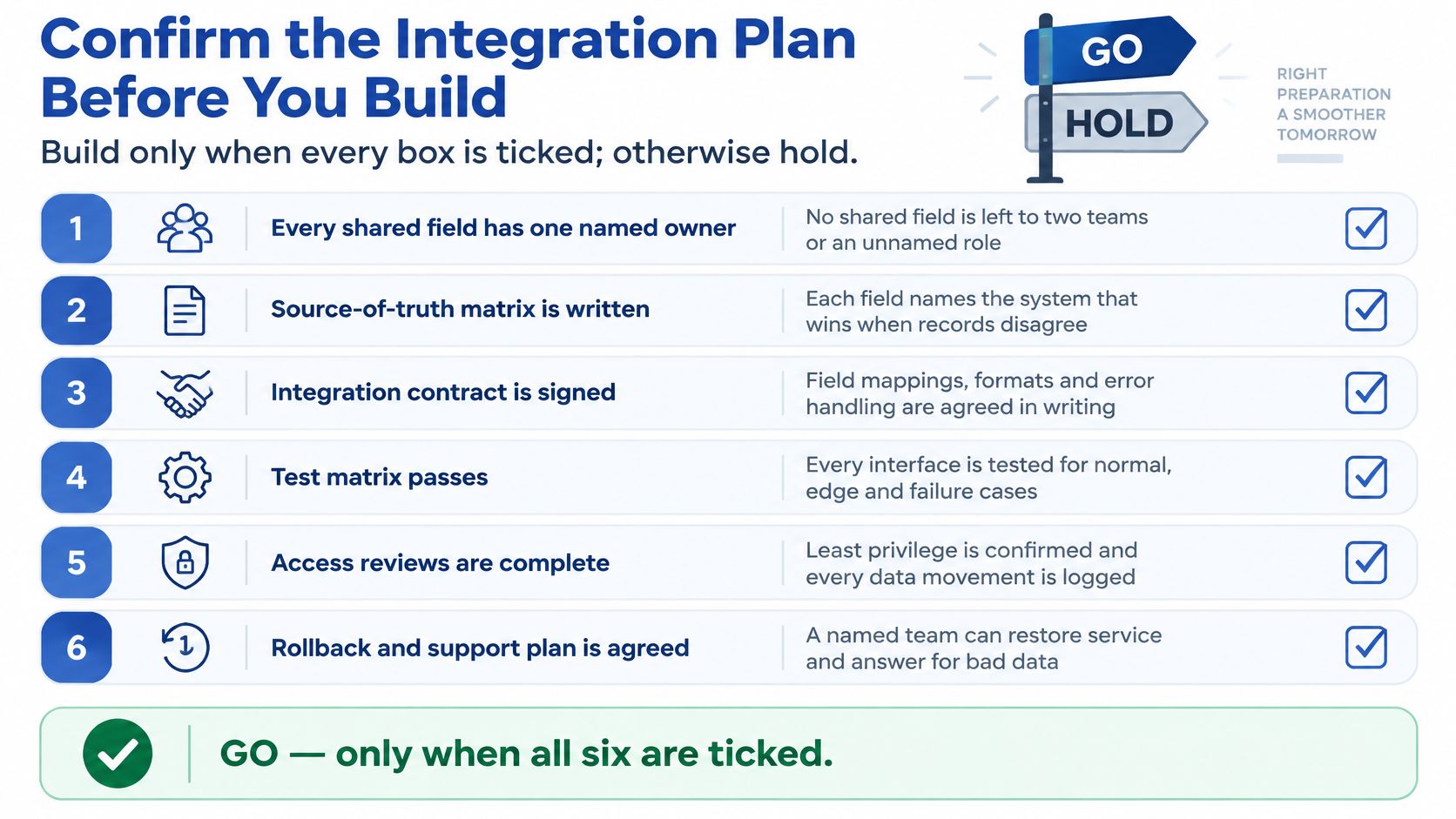
- One named owner per shared field is documented and accepted by the business.
- The source-of-truth matrix and integration contract are written and signed off.
- The six-case interface test matrix passes in staging, including retries and revoked credentials.
- Access reviews, audit logs, and human approval points are configured.
- A realistic payback estimate justifies the full lifecycle cost of each connection.
- A phased cutover date and tested rollback plan are agreed across operations and IT.
If even one box is blank, hold the build. Fixing a missing ownership rule or a broken mapping assumption takes an hour on paper and weeks in production.
Questions to Settle During Scoping
Start this week by scoring your own environment against the six challenges from the start of this guide, ranking each connection against the build, phase, or keep-manual criteria, and flagging the two bottlenecks costing you the most manual hours or billing errors. Then bring that shortlist into a formal scoping session rather than chasing a ballpark quote over email.
At Wisely, custom integration and API work is priced after assessing its actual complexity, and third-party connections or bespoke automation beyond a standard platform toolset are quoted separately. Multi-pipeline builds and larger rollouts are always scoped thoroughly before anyone commits to a number. Because we provide helpdesk, cloud, software development, and security under one roof, one supplier stays accountable when an interface misbehaves, while our written boundary with your internal IT person keeps day-to-day duties crystal clear.
When you request a written assessment through a specialist platform integration consultancy, put five direct questions on the table:
- Systems and fields in scope: Which exact platforms, records, and historical data are included in phase one, and what stays out of scope?
- Vendor connectors versus custom code: Which links rely on vendor-maintained connectors, and which need custom API code that requires ongoing maintenance?
- Credentials, access, and logging: Where are API credentials stored, how are quarterly access reviews run, and who monitors audit logs?
- Incident and rollback ownership: Who triages a failed sync at 8:00 am on a Monday, cleans up rejected records, and holds authority to trigger rollback?
- Phased cost and target payback: What does each stage cost all-in, including testing and training, and what measurable operational saving does it target?
Walk away from scoping with two documents in hand: your completed six-point go-or-hold checklist and a written, phased assessment tied to real payback.
If disconnected tools are slowing down your finance, operations, or project teams, our team at Wisely brings platform integration, cloud engineering, software development, and cybersecurity together under one roof. We start by embedding with your staff to map real workflows, assess your existing stack, and deliver a scoped integration plan that settles payback and data ownership before any build begins. Visit Wisely to book a scoped integration assessment and turn your patchwork of tools into a reliable, decision-ready system.