Month-end often looks the same in small businesses. Someone exports customer data from a CRM, retypes invoice details into the accounting system, chases a manager for approval, spots a GST coding issue late, then stays back to tidy the mess before filing. The work gets done, but it pulls attention away from sales, service, and cashflow decisions.
That's why automate your accounting - top 10 tips matters now. In New Zealand, digital accounting has already moved into the mainstream. The Ministry of Business, Innovation and Employment reported that 65% of businesses used accounting software in 2019, up from 44% in 2016, and 49% were using cloud accounting software according to Andersen's summary of the MBIE figures. The base is already there. The next step isn't buying more software for the sake of it. It's connecting the systems you already use so data moves once, correctly, and with a clear audit trail.
Introduction Why Manual Accounting Is Holding Your Business Back
A familiar example is client invoicing. A team closes a sale in the CRM, then someone manually rebuilds that invoice in Xero, checks line items, confirms GST, sends it, and later follows up for payment. If customer details sit in a database instead of flowing automatically, the same information gets handled again and again.

That repeated handling is where businesses lose time and accuracy. In practice, manual invoicing from CRMs or databases is often the first pain point owners mention. When that data input is automated with n8n or Zapier, teams have seen a 90% reduction in time, and the error rate improves from 11% to less than 1%. The gain isn't just speed. It's fewer corrections, fewer awkward customer emails, and cleaner records at month-end.
Why this hurts more in New Zealand
NZ businesses also carry compliance pressure. GST mistakes don't stay isolated. One mis-coded bill or invoice can flow into reports, reconciliations, and filing. Xero's New Zealand GST workflow is built to calculate GST on each transaction, generate GST returns, and submit securely to IRD through Xero GST return filing for NZ businesses. That's why safe automation starts with good data capture and approval rules, not just with convenience features.
Practical rule: If your team types the same information twice, that process is a strong automation candidate.
What a better setup looks like
A better setup is simple to picture:
- Sales data flows from the CRM into your accounting system without rekeying.
- Invoices route for approval automatically when they hit a threshold or exception.
- GST treatment is applied consistently based on rules, not memory.
- Cashflow and revenue reports refresh daily so owners don't wait for month-end to understand the business.
For businesses that want accounting connected to broader finance support, Wisely's accounting services sit in that middle ground between bookkeeping and workflow design. The useful shift is thinking less about isolated tasks and more about one joined-up process from sale to cash to reporting.
What Accounting Automation Really Means for SMBs
Accounting automation is easiest to understand as a production line for financial data. In a manual business, staff carry each item by hand from one station to the next. In an automated business, the work still moves through stations, but the conveyor does the carrying.
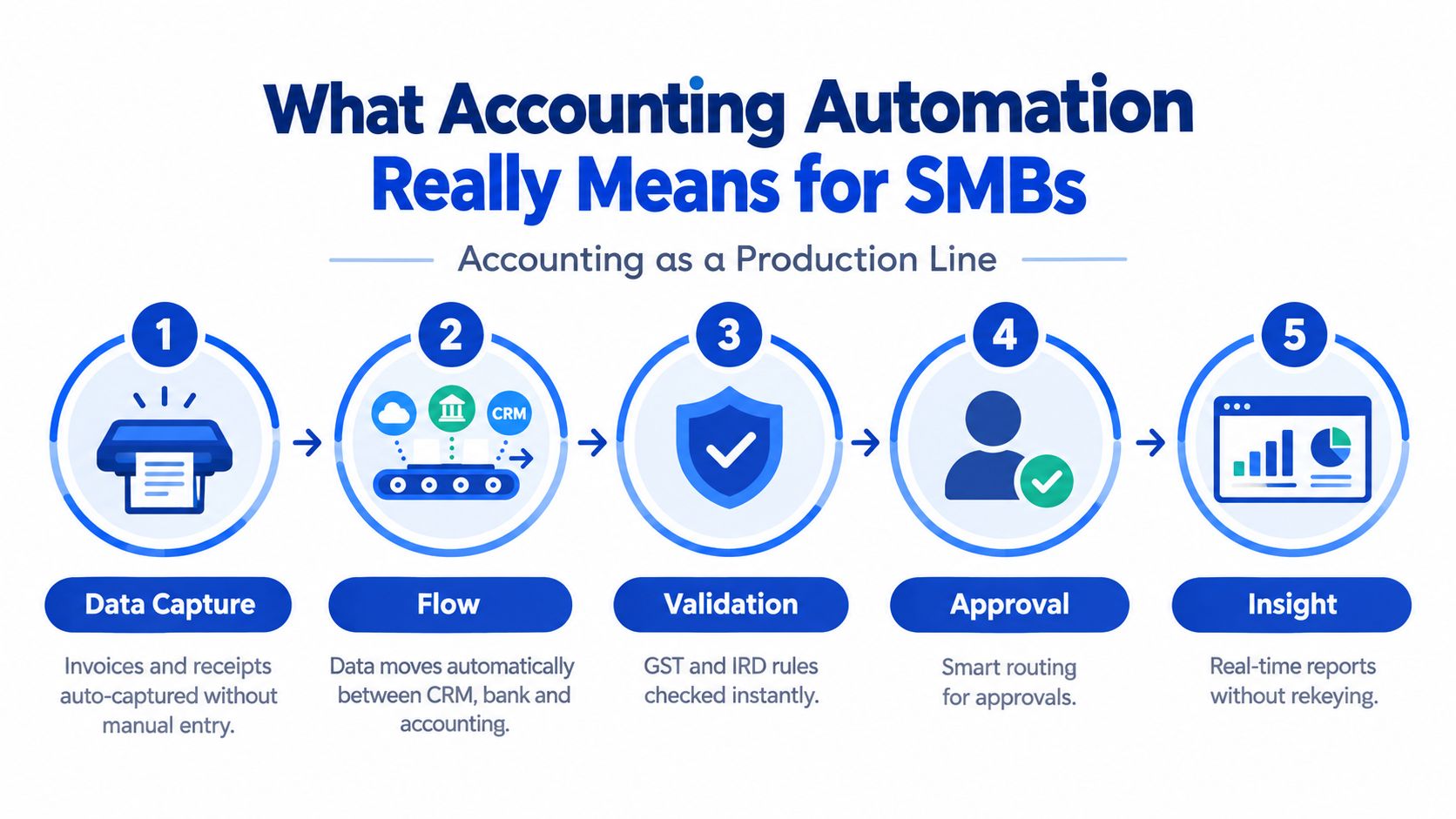
The five parts of the production line
Capture
Data enters once. That might be a customer record from a CRM, a supplier invoice scanned with OCR, or a receipt uploaded from a phone.Coding
The system applies the right account, tax treatment, customer, supplier, or project code based on rules.Routing
The transaction goes to the right person when approval is needed. Low-risk items can pass straight through. Exceptions can pause for review.Reconciliation
The accounting system matches what should have happened with what happened in the bank or ledger.Reporting
Dashboards and monthly reports draw from live data instead of spreadsheets that someone updates late.
Digitised isn't the same as automated
Many businesses think they've automated because documents are digital. A PDF invoice in an inbox isn't automation. It's still a manual task wearing digital clothes. True automation removes rekeying, reduces handoffs, and leaves a trail showing who approved what and when.
That audit trail matters. It protects the business when someone asks why GST was treated a certain way, why a supplier was paid, or why revenue landed in a specific month. If you want a practical outside read on how connected workflows reduce errors with accounting automation, that piece from Snyp explains the logic well.
Good automation doesn't remove control. It moves control closer to the point where data enters the system.
Why this matters beyond bookkeeping
Once data arrives cleanly, accounting stops being a rear-view mirror. Owners can use it for decisions. A Virtual CFO mindset starts with the same mechanics as automation: clean source data, reliable approvals, and reports you can trust without a manual rebuild.
Here's the simplest test. Ask whether your team spends more time moving numbers or using numbers. If it's the first one, the problem usually isn't effort. It's workflow design.
Where Time Disappears and What to Automate First
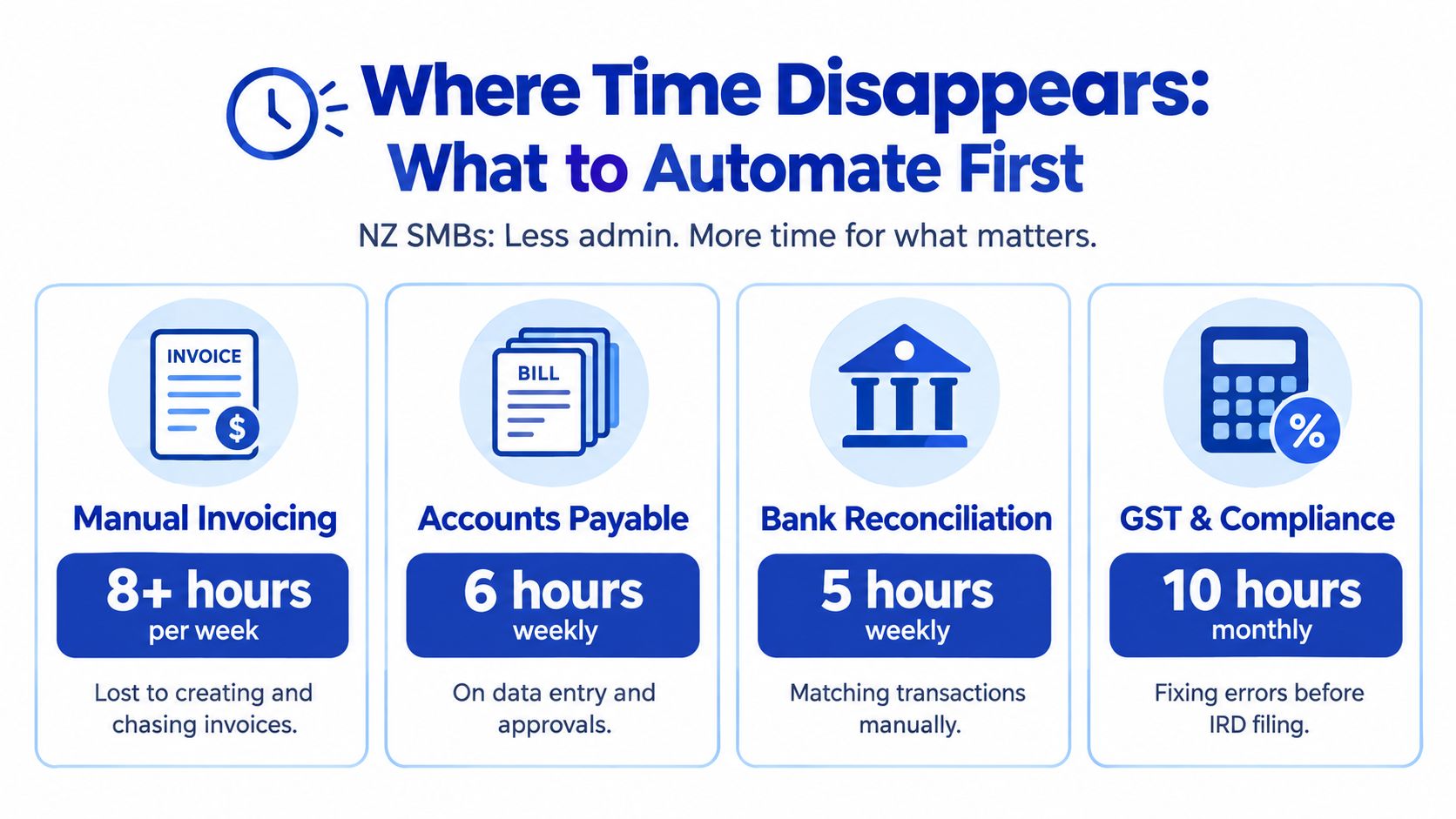
Most SMBs don't need to automate everything at once. They need to find where hours leak out, then fix the worst bottlenecks first.
Start with the obvious handoffs
The easiest way to diagnose waste is to follow one transaction from start to finish. For example, take a client invoice and ask:
- Where is data first created
- Who re-enters it
- Where does approval stall
- What gets checked again later
- Which step creates GST or reporting risk
In many firms, the answer points back to invoicing, payables, and reconciliation. A New Zealand case study on invoice processing says manual invoice handling can take 45 minutes per invoice, and at 50 invoices per week that equals 37.5 hours of human time each week before automation. The same source says the automated version processes invoices in about 3 minutes each with 99.7% accuracy in this NZ invoice automation case study.
Where NZ finance teams still get stuck
Accounts payable is a major example because delays often come from approvals rather than from the invoice itself. A 2025 FUJIFILM Business Innovation New Zealand AP survey reported that 61% of organisations had automated less than 25% of AP, invoice processing averaged 11 to 20 days, and 47% saw frequent approval delays from manual processes in the FUJIFILM Business Innovation NZ AP survey summary.
That finding matters because it changes the priority list. If approvals are the chokepoint, there's little value in only digitising document intake. You need routing rules, exception handling, and clear thresholds.
Quick diagnostic: If your invoice sits waiting for a reply in email, you haven't automated the process. You've only moved the paperwork online.
A simple order of operations
Use an impact-versus-effort lens:
| Process area | Why it usually goes first | What to look for |
|---|---|---|
| Client invoicing | Revenue data often gets rekeyed from CRM or database | Repeated customer details, item lines, tax codes |
| Supplier invoices | Approvals and coding create delays | Email approvals, missing references, PO mismatches |
| Reconciliation | Frequent and repetitive | Recurring transactions that should match predictably |
| Reporting | Owners need visibility without spreadsheet rebuilding | Manual consolidation, stale cashflow views |
One more useful reality check: automation isn't equally valuable in every business. A 2025 AP automation survey of nearly 100 NZ finance leaders focused on organisations handling annual invoice volumes from 5,000 to 250,000, which suggests the strongest ROI questions sit in higher-volume environments rather than in very small firms, as noted in the Better Business FUJIFILM AP automation coverage.
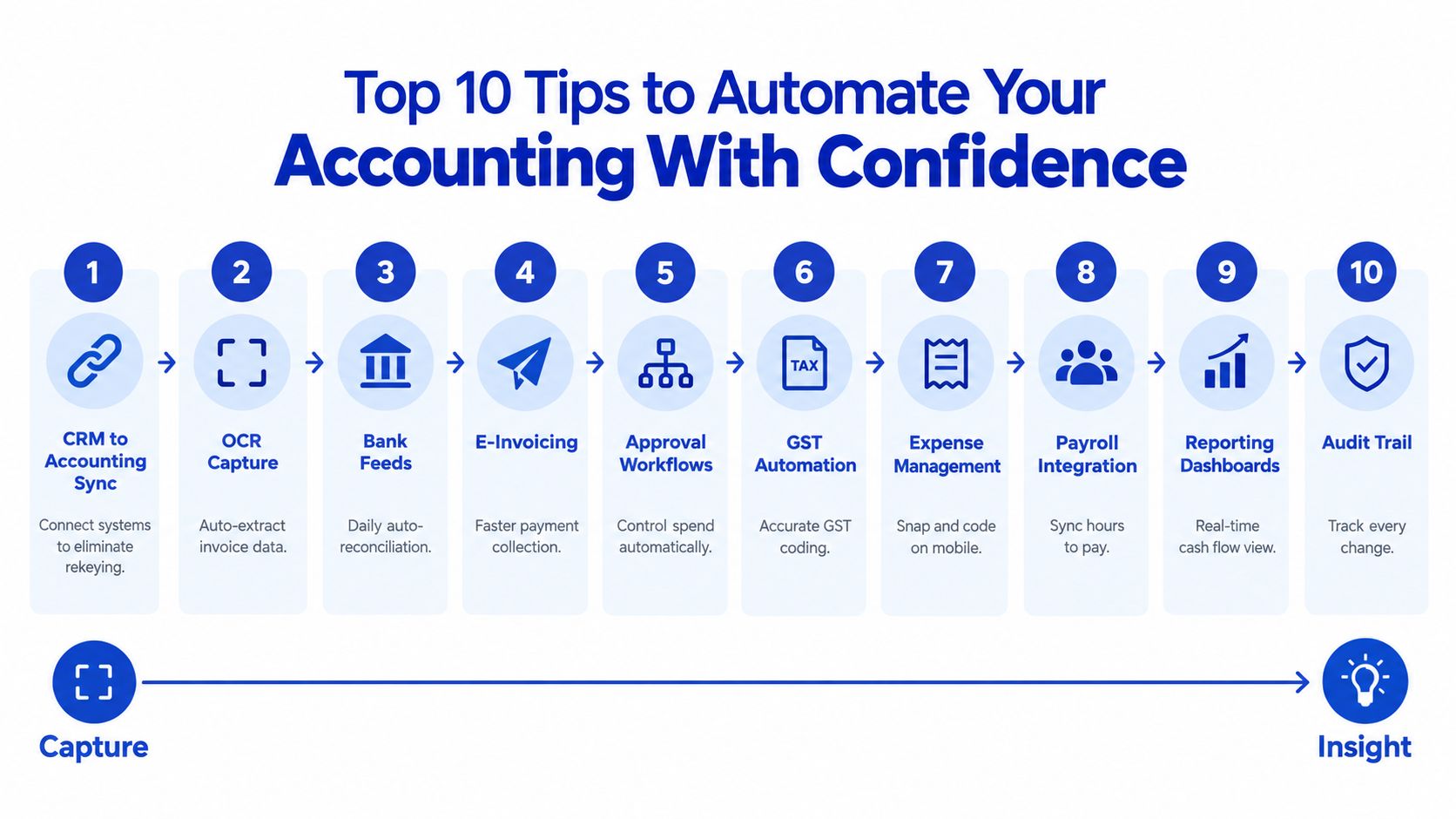
Top 10 Tips to Automate Your Accounting With Confidence
The most reliable approach is to move from source data to reporting in a logical sequence. Don't start with dashboards if the inputs are still messy.
1. Connect your CRM to invoicing
This is often the fastest win for small businesses. If your team invoices manually from a CRM or database, automate the data input with n8n or Zapier. In client work, that change has delivered a 90% reduction in time, with the error rate improving from 11% to less than 1%.
The reason it works so well is simple. Sales data already exists. Rekeying it adds no value.
2. Use OCR for supplier invoice capture
If bills arrive by email as PDFs, OCR can extract supplier name, dates, amounts, and line items. Staff then review exceptions instead of typing every field.
That gives you a cleaner intake process and makes later approval routing far easier.
3. Turn on rule-based bank reconciliation
Recurring bank transactions should not need fresh thinking every time. Smart matching rules help the system recognise repeat patterns and reduce manual matching work.
This is also one reason AI use is growing in NZ accounting. A New Zealand page from Xero says businesses using AI accounting tools report saving 22+ hours a month, with the savings linked to automated bank reconciliation and related workflows in Xero's NZ AI in accounting overview.
4. Automate GST handling at the transaction level
Don't leave GST decisions until filing time. Apply coding rules when the transaction enters the system. That way, the return becomes an output of good process rather than a cleanup exercise.
5. Build approval workflows with thresholds
Approvals should move by rule, not by inbox luck. Set approval paths based on amount, supplier, department, or mismatch conditions. Straightforward items can pass through. Exceptions can stop for review.
6. Schedule payment reminders for receivables
Late payment follow-up is repetitive, and businesses often leave it too late because it feels awkward or time-consuming. Automated reminders keep cash collection moving without relying on memory.
7. Capture expenses at source
Receipts are easiest to code when they're fresh. Mobile expense capture helps staff submit evidence immediately, and it reduces end-of-month paper hunts.
8. Integrate payroll with your accounting workflow
Payroll is one of those areas where mistakes create staff frustration fast. Integration reduces duplicate handling and makes month-end journals easier to trust.
9. Automate monthly reporting and daily revenue and cashflow views
For many small businesses, the three fastest integration wins are CRMs, monthly reporting, and daily automated revenue and cashflow reporting. Owners stop waiting for finance to “finish the books” before they can make decisions.
A NZ source on Xero automation says seven targeted workflows, including invoicing, reconciliation, reminders, expense capture, payroll, purchase order approvals, and integrated reporting, can recover ten or more hours of manual admin each month in this Xero workflow automation article for NZ businesses.
Here's a short walkthrough of the kind of workflow many teams aim for:
10. Protect everything with an audit trail
Automation without traceability creates risk. You want every transaction to show where it came from, what rule touched it, who approved it, and what changed.
What to remember: The right end point isn't “fully hands-off”. It's “hands-off until something needs judgement”.
If you need orchestration between systems rather than a single app feature, workflow automation services can connect CRM records, approvals, accounting entries, and reporting outputs into one controlled flow.
Choosing the Right Integrations and Tools for Fast Wins
The right stack depends on how your business works now, not on a generic automation checklist. A service business with sales driven through a CRM usually gets value fastest by linking revenue data first. A product business with supplier complexity may get more from AP controls and approvals.
The three fastest wins for many SMBs
The fastest wins are often:
- CRM integration for invoice creation and customer data flow
- Monthly reporting automation for board packs, management reports, and less spreadsheet assembly
- Daily automated revenue and cashflow reporting so owners can act earlier
That doesn't mean native bank feeds and expense tools don't matter. They do. It means the highest visible business impact often comes from the systems that shape invoicing and visibility, not just bookkeeping hygiene.
Fastest Win Integrations Compared
| Integration | What It Automates | Typical Time Recovered | Control Tip |
|---|---|---|---|
| CRM to accounting | Customer details, invoice creation, sales data flow | High when staff currently rekey invoices manually | Lock field mappings before go-live |
| Monthly reporting | Report assembly, recurring pack generation, management summaries | Strong when reports are spreadsheet-heavy | Approve one source of truth for each metric |
| Daily revenue and cashflow reporting | Dashboard refresh, cash visibility, trend monitoring | High for owners making frequent decisions | Review exceptions, not every line |
| Bank feeds and reconciliation | Transaction import and matching | Useful where recurring items are common | Set and review matching rules regularly |
| Expense apps | Receipt capture and coding | Best where staff submit many claims | Require receipt evidence at source |
Native integration or middleware
Native integrations are usually the cleanest place to start. They're simpler to maintain and often suit standard workflows. Middleware such as n8n or Zapier makes more sense when you need custom logic, multi-step routing, or you're bridging a CRM, database, reporting layer, and accounting platform together.
For businesses operating across multiple tools or entities, it can help to review examples of accounting sync for global businesses, especially when consistency between systems matters as much as the accounting entry itself.
A practical middle path is common. Use native Xero connections where they cover the basics, then add custom automation only where handoffs still exist. If your team already runs on monday.com and needs finance data connected into operational workflows, Xero integration with monday.com is one way to keep approvals, status, and reporting in sync without another spreadsheet layer.
Governance Controls and Your Implementation Roadmap
Automation works best when control is built in from day one. In accounting, “move fast and fix later” creates exactly the kind of cleanup nobody wants at filing time.
Start with compliance-critical workflows
Existing advice often focuses on convenience tasks first, but New Zealand businesses need a compliance-first sequence. A NZ-focused 2026 guide recommends starting with GST, payroll, supplier payments, and statutory reporting, then setting approval rules before wider access in this NZ automation and controls guide.
That order makes sense. These are the areas where errors have the sharpest downstream effect.
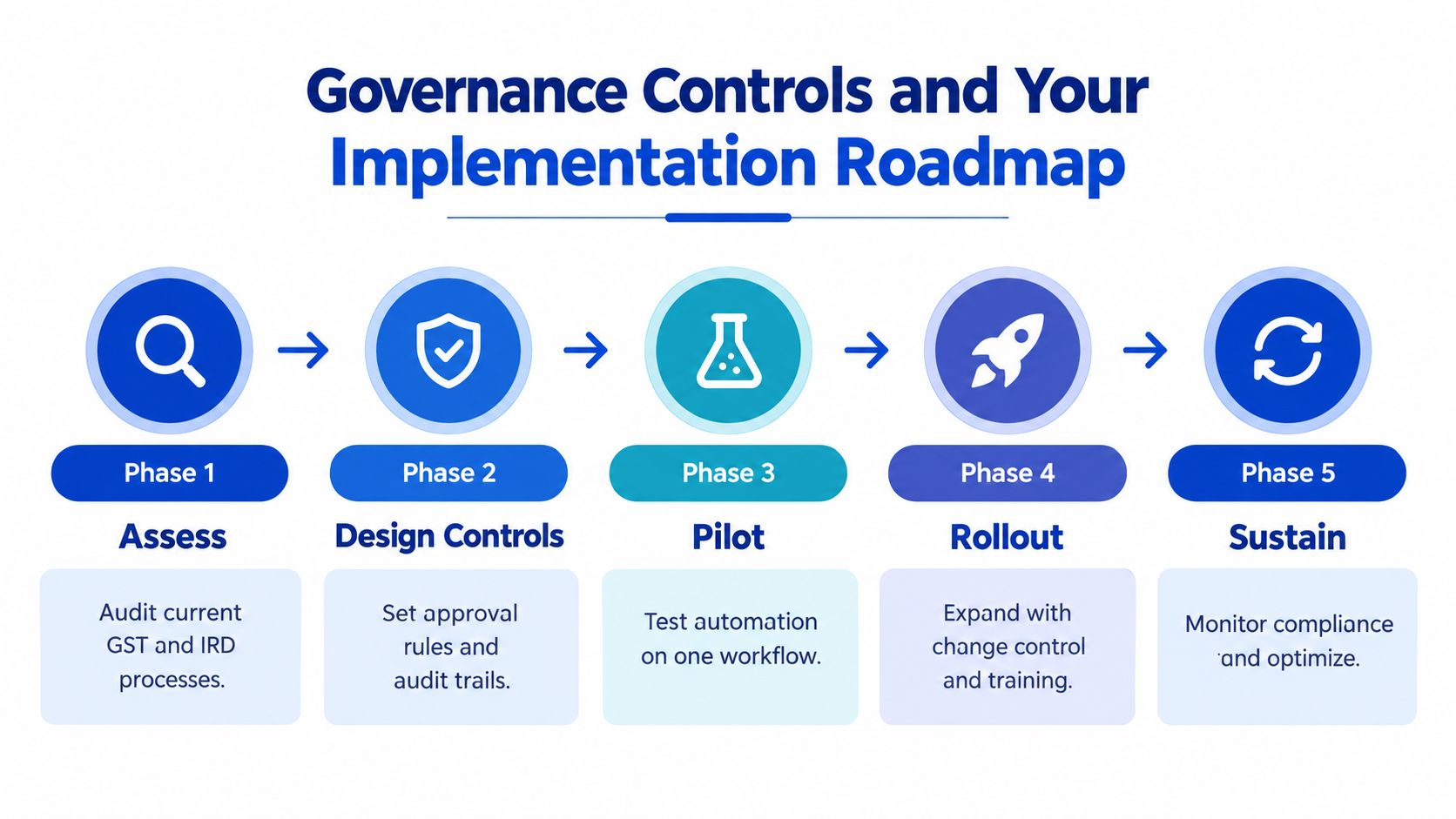
A five-phase roadmap
Assess
Map current GST handling, filing steps, approval paths, and spreadsheet workarounds.Design controls
Set who can approve what, what thresholds trigger review, and what evidence must be attached.Pilot one workflow
Start with one contained process such as CRM-to-invoice flow or supplier invoice approvals.Roll out gradually
Expand to related processes once the exceptions and ownership are clear.Sustain and review
Monitor exceptions, update rules, and train staff on the changed process, not just the tool.
Why governance improves speed
Controls often get framed as friction. In reality, good controls reduce backtracking. If GST treatment is set at capture, if approval thresholds are clear, and if each action is logged, month-end becomes lighter because the checking happened earlier.
A clean audit trail is a time-saver. It stops the same question being answered three times by three different people.
This is also where finance oversight matters. Automation can produce faster data, but leadership still needs forecasting, budgeting, and cashflow planning wrapped around that data. The strong combination is process automation underneath and Virtual CFO judgement above it.
Real World Examples and Your Next Steps to Get Started
One practical example is a business that invoices from CRM records. Before automation, staff pulled details manually, rebuilt invoices in the accounting system, and corrected avoidable mistakes later. After connecting the workflow with n8n or Zapier, the invoicing step saw a 90% reduction in time, and the error rate improved from 11% to less than 1%.
Another example is a finance team buried in repetitive admin across data entry, invoice chasing, and reconciliation. A New Zealand accounting practice automation article reports that the average practice spends 35 hours weekly on those tasks manually, while automated practices complete the same work in under 10 hours in this NZ practice automation article. That kind of shift matters because it changes what finance staff do all week, not just how fast they type.
A sensible first month usually looks like this:
- Map one painful workflow such as CRM-to-invoice or supplier invoice approvals.
- Measure the current pain in hours, delays, and error corrections.
- Choose one integration path using native connectors first, then middleware if needed.
- Set approval and exception rules before expanding access.
- Review the result after one cycle and only then automate the next process.
If your business handles more exceptions than volume, start there. That's usually where automation pays for itself fastest because it removes repeated admin while keeping human judgement for the tricky items.
Wisely helps businesses connect accounting systems, CRMs, approvals, and reporting into controlled workflows that are easier to run and easier to trust. If you want to remove rekeying, tighten GST-safe processes, and build better daily visibility into cashflow, visit Wisely to explore automation, integration, and finance support options.